Remote Patient Monitoring Software Development: Features and Architecture
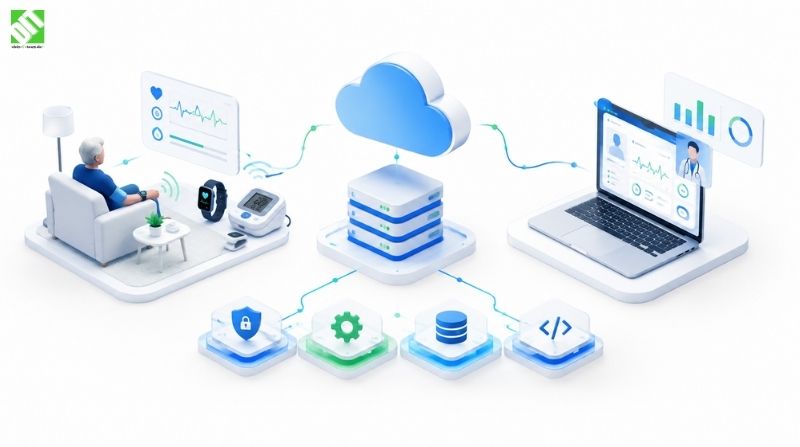
Learn how remote patient monitoring software development works: device integration, clinician dashboards, alerting logic, architecture, and data security.
Remote patient monitoring software development is the work of building a system that collects health readings from patients outside the clinic, moves that data securely to a central platform, and gives clinicians the context they need to act on it. A blood pressure cuff in a living room, a glucose sensor on an arm, a pulse oximeter on a fingertip: each one is only useful if the reading reaches the right person, in the right form, at the right time.
That sounds simple until you start building it. Devices speak different protocols. Patients forget to sync. Clinicians are already overloaded, so a dashboard that adds noise gets ignored. And the data is sensitive enough that security has to be designed in from the first sprint, not added before launch.
This guide covers what an RPM platform is made of, the features that matter, how the architecture fits together, and what to settle before development starts. It focuses on four areas that decide whether these projects succeed: device and sensor integration, the clinician dashboard, alerting logic, and data security. Regulatory review is treated as a planning step, because it shapes scope early.
What Is Remote Patient Monitoring Software?
Remote patient monitoring software is a platform that captures patient health data from connected devices outside a clinical setting and makes it available to care teams for review, trend analysis, and follow-up. Most systems have four layers: the devices and patient-facing app, a data ingestion layer, a processing and rules engine, and a clinician-facing dashboard.
It is often confused with telemedicine, so the distinction is worth making. Telemedicine centers on a live consultation, usually by video or chat. Remote patient monitoring is continuous or scheduled data collection between visits. In practice, many products combine both, and this is why telemedicine app development and remote patient monitoring app development often end up in the same project plan. A clinician reviews a week of readings, spots a pattern, and opens a video call from the same screen.
Common use cases include:
Chronic condition management, such as hypertension, diabetes, and heart failure
Post-discharge follow-up after surgery or hospital stays
Elderly care and assisted living support
Respiratory monitoring for patients with ongoing breathing conditions
Pregnancy and postnatal monitoring
An illustrative example: a clinic enrolls patients with high blood pressure. Each patient gets a Bluetooth cuff and a mobile app. Readings sync after each measurement, and the care team sees a ranked list of patients whose recent averages have moved outside their personal thresholds. That scenario is hypothetical, but it shows the shape of the product: devices in, rules in the middle, prioritized insight out.
Core Features of an RPM Platform
A good feature set is shaped by workflow, not by a checklist. Still, most RPM products share a common foundation.
Patient-side features
Simple onboarding and device pairing
Automatic data sync with manual entry as a fallback
Reminders for scheduled measurements
Symptom check-ins and short questionnaires
Readable history of their own readings
Secure messaging or call access to the care team
Clinician-side features
Patient list with risk-based prioritization
Trend charts for each metric and time range
Configurable thresholds per patient or per condition
Alert inbox with status tracking
Notes, task assignment, and care plan fields
Reporting for review and billing support, where relevant
Admin and platform features
Role-based access control
Device inventory and assignment
Audit logs
Multi-clinic or multi-tenant support
Integration settings for electronic medical record systems
The patient app deserves more attention than it usually gets. If a patient finds pairing frustrating, readings stop arriving, and the platform quietly fails. Clear UI and forgiving flows matter as much as the backend, which is why UI/UX design belongs in discovery rather than as a final polish step. (That anchor is not linked here on purpose; see the internal linking check below.)
Device and Sensor Integration
Device integration is where most RPM projects get harder than expected. The question is not only “can we read the data” but “can we read it reliably across many devices, firmware versions, and phone models.”
How Devices Send Data
There are three common paths from a sensor to your platform:
Direct to app over Bluetooth Low Energy (BLE). The device pairs with the patient’s phone. The app reads the measurement and uploads it. This is common for cuffs, scales, and glucose meters.
Through a hub or gateway. A small home device collects readings from several sensors and forwards them over Wi-Fi or cellular. This helps patients who do not use smartphones.
Through a vendor cloud API. The device manufacturer stores the data, and your platform pulls it through the vendor’s API. This reduces mobile work but adds a dependency on the vendor.
Each path has trade-offs. BLE gives you control but requires careful mobile development across iOS and Android, where background behavior differs. Hubs are dependable for non-technical patients but add hardware logistics. Vendor APIs are fast to start with, but you inherit their rate limits, data formats, and uptime.
Practical Integration Concerns
Data normalization. One device reports systolic and diastolic values in separate fields, another sends a combined payload. Your ingestion layer should convert everything into one internal schema with consistent units and timestamps.
Timestamp handling. A reading taken at 8:00 and synced at 14:00 must be stored with its measurement time, not its upload time. Mixing them up produces misleading trends.
Duplicate and out-of-order data. Retries and reconnections create duplicates. Idempotent ingestion prevents the same reading from being counted twice.
Device identity. Each reading should be tied to a verified device and patient assignment, so a shared cuff does not mix up two records.
Offline behavior. The app should queue readings and sync later without losing them.
This is the territory of connected-device engineering, and teams that have worked on IoT solutions bring useful habits here: device lifecycle management, telemetry pipelines, and handling unreliable connections. When you scope the project, list every device model you plan to support at launch. Each one is a separate integration with its own testing effort.
Architecture of a Remote Patient Monitoring System
Architecture decisions depend on patient volume, device variety, integration needs, and where you intend to operate. The table below shows the layers most RPM systems share and what each is responsible for.
| Layer | Main responsibility | Key considerations |
| Device and patient app | Capture readings, pair devices, collect check-ins | BLE reliability, offline queueing, accessible design |
| Ingestion layer | Receive, validate, and normalize incoming data | Idempotency, schema versioning, throughput spikes |
| Processing and rules engine | Evaluate readings against thresholds and trends | Configurable rules, low latency, explainable outcomes |
| Data storage | Store time-series readings, patient records, audit logs | Retention policy, encryption, query performance |
| Clinician dashboard | Display priorities, trends, and tasks | Clarity, role-based views, speed |
| Notification service | Deliver alerts by push, SMS, email, or in-app | Delivery tracking, escalation, fallback channels |
| Integration layer | Connect to EMR, labs, scheduling, and billing systems | Standards support, error handling, mapping |
| Security and identity | Authentication, authorization, logging | Least privilege, session control, key management |
Monolith or Microservices
For a first release, a well-structured modular backend is often more practical than a full microservices setup. Splitting ingestion, rules, and notifications into independent services makes sense when load or team size demands it. Starting with clean boundaries lets you separate them later without a rewrite.
Time-Series Data
Vitals are time-stamped measurements, and queries typically ask for ranges: the last seven days, the last ninety days, the change since discharge. Storage that handles time-series data well keeps dashboards quick as patient history grows. The exact database choice depends on your scale, team expertise, and hosting environment, so it is better decided during architecture planning than assumed up front.
Integrations With Existing Systems
An RPM platform rarely lives alone. Clinicians expect readings and notes to appear in the record system they already use, and administrators expect scheduling and billing data to line up. This is where API development and integration becomes a central workstream. Plan for healthcare data exchange standards early, agree on field mappings with the receiving system’s owners, and build retry and error handling for the day an external service is down. Integration is usually the part that stretches timelines, because it depends on other teams and other vendors.
Designing the Clinician Dashboard
A clinician dashboard has one job: help a busy person decide who needs attention first. If it shows everything equally, it helps no one.
Principles That Work in Practice
Prioritize, then display. Lead with a ranked patient list based on recent alerts, trend direction, and missed readings. Detail comes after the click.
Show trends, not just values. A single reading of 150 systolic means little. Seven days of readings against the patient’s baseline means a lot.
Keep context close. Medication notes, care plan targets, and last contact should sit beside the chart, not three screens away.
Support different roles. A nurse coordinator, a physician, and a clinic administrator need different default views.
Make actions obvious. Acknowledge, escalate, assign, call, or message should be one step from the alert.
Design for interruption. Clinicians switch tasks constantly. The screen should make it easy to resume where they stopped.
Speak with clinicians before wireframing. Short interviews about how they currently review patient data will expose assumptions you would otherwise only discover after launch.
Alerting Logic: Turning Readings Into Useful Signals
Alerting is the feature that separates a data viewer from a monitoring system. It is also the easiest to get wrong. Too many alerts and staff stop trusting them. Too few and real events slip past.
Building Blocks of Alert Logic
Threshold rules. A reading above or below a defined limit triggers an alert. Limits should be configurable per patient, because a safe range for one person is not safe for another.
Trend rules. A steady rise over several days may matter more than a single high value.
Missing data rules. If a patient has not measured for a set period, that itself can be a signal.
Combination rules. Two moderate changes together, such as rising weight and rising heart rate, may justify more concern than either alone.
Severity tiers. Not every alert needs the same response.
| Severity | Example trigger (illustrative) | Typical routing |
| Informational | Slight drift from baseline | Dashboard flag only |
| Moderate | Repeated out-of-range readings | In-app alert to care coordinator |
| Urgent | Reading far outside configured limits | Push or SMS to on-duty clinician with escalation |
The thresholds in a real product must come from the clinical team that owns the care protocol, not from developers. The software’s role is to apply those rules consistently and make them easy to adjust.
Reducing Alert Fatigue
Group repeated alerts for the same patient and cause
Let clinicians snooze or acknowledge with a reason
Add escalation when an alert is not acknowledged within a set time
Track alert volumes and response times so rules can be refined
Keep a log of why each alert fired, so the logic stays explainable
If you later add predictive features, such as models that flag early deterioration risk, treat them as a layer on top of transparent rules rather than a replacement. Clinicians trust what they can inspect.
Data Security in Remote Patient Monitoring
Health data is among the most sensitive information a system can hold, and RPM platforms add exposure points: phones, home networks, wireless links, and cloud services. Security needs to be a design input from the start.
Core practices to plan for:
Encryption in transit and at rest for readings, messages, and stored records
Strong authentication, including multi-factor options for clinicians and admins
Role-based access control so users see only the patients and fields they need
Audit logging of who viewed or changed what, and when
Secure device pairing and verification of device identity
Secrets and key management kept out of source code and rotated on a schedule
Data minimization, collecting only what the care process requires
Retention and deletion rules that match your policy and legal requirements
Regular security testing, including penetration testing before launch and after major changes
Backup and recovery plans with tested restore procedures
Hosting location and cloud setup also matter, especially for organizations operating in Europe. Decisions about where data is stored and processed should be made deliberately. Teams experienced with cloud integration and cloud architecture can help weigh hosting options, network isolation, monitoring, and scaling against your risk profile.
Regulatory Review as a Planning Step
Before design is finalized, the project should include a regulatory review. This is not a box to tick at the end. It affects scope, architecture, documentation, and budget.
Questions to bring to qualified legal and regulatory advisers early:
Does the software, or any of its features, fall under medical device rules in the markets you plan to serve?
Which data protection requirements apply to the data you collect and the countries involved?
What consent and patient information flows are needed?
What documentation, validation, and quality processes will the project need to maintain?
Do the devices you plan to integrate carry their own approvals or limitations?
What are the requirements for data storage location, retention, and cross-border transfer?
A development team can build to the requirements your advisers define, but it should not substitute for them. Treat the answers as inputs to the product backlog, and revisit them when features change. Something like automated alert interpretation may be assessed differently from a simple data display, so the review should happen before those features are committed.
The Development Process, Step by Step
A practical lifecycle for an RPM product looks like this:
Discovery and requirements. Define the patient group, the clinical workflow, the devices, and the success measures. Interview clinicians and, where possible, patients.
Regulatory and risk review. Settle the regulatory path, data protection approach, and risk assumptions with advisers.
UX and UI design. Prototype the patient app and clinician dashboard and test them with real users.
Architecture planning. Choose the structure, data storage approach, hosting setup, and integration plan.
Development in iterations. Build ingestion, rules, dashboard, and patient app in agile sprints, with early device testing.
Integrations. Connect to record systems, notification channels, and other services.
Testing and QA. Cover device compatibility, load, failure scenarios, alert accuracy, accessibility, and security.
Pilot. Launch with a small group, watch real usage, and adjust thresholds and workflows.
Deployment and monitoring. Roll out with observability on device sync rates, alert delivery, and system health.
Maintenance and improvement. Handle device firmware changes, operating system updates, and new feature requests.
If you are still deciding on overall scope and budget, the related guide on healthcare app features, cost, and timeline covers the broader planning questions that apply across healthcare products.
What Influences Cost and Timeline
There is no honest single price for an RPM platform, because the variables are wide. The main cost drivers are:
Number and type of supported devices
Patient app platforms (iOS, Android, or both)
Complexity of the alerting rules and any analytics
Number and depth of system integrations
Real-time requirements
Security and audit requirements
Regulatory documentation effort
Multi-language or multi-region needs
Pilot scope and post-launch support
A narrow first version, such as one condition, two device models, and a basic dashboard, can be scoped much more tightly than a multi-condition platform with many integrations. A phased approach usually lowers risk: prove the core workflow, then widen it.
Choosing a Development Partner
Look for a team that asks about your clinical workflow before talking about technology. Useful signals include experience with connected devices, secure data handling, integration work, and long-term support. Ask how they handle device testing, how they document architecture decisions, and how they plan for maintenance after launch.
DEIN IT TEAM works as a software and digital transformation partner across custom development, mobile, cloud, IoT, and integration work, with European project management and a delivery model that supports projects from discovery through post-launch maintenance. For an RPM product, that range matters because the work touches mobile apps, device connectivity, backend systems, and dashboards at once.
Conclusion
Remote patient monitoring software development comes down to a few disciplined decisions. Integrate devices in a way that survives real-world conditions. Build a clinician dashboard that prioritizes instead of overwhelming. Design alert logic that clinicians trust and can adjust. Protect data at every layer. And treat regulatory review as an early planning activity so it shapes the product instead of interrupting it.
A sensible next step is to write down your patient group, the devices you expect to support, and the workflow a clinician will follow when an alert arrives. Those three items clarify scope more than any feature list. If you are at that stage, you can discuss your project with the DEIN IT TEAM and work through scope, architecture, and a phased plan.
Frequently Asked Questions
What is remote patient monitoring software?
It is a platform that collects health data from connected devices used outside a clinic and presents it to care teams for review, trend tracking, and follow-up. It usually includes a patient app, a data pipeline, alert rules, and a clinician dashboard.
How is remote patient monitoring different from telemedicine?
Telemedicine focuses on live consultations by video, call, or chat. Remote patient monitoring focuses on collecting data between visits. Many products combine both so clinicians can review readings and start a consultation in one place.
What features should an RPM platform include?
At minimum: device pairing and data sync, a patient app, a clinician dashboard with trends, configurable alerts, secure messaging, role-based access, audit logs, and integration with existing record systems.
How long does remote patient monitoring app development take?
It depends on scope. Device count, integrations, alert complexity, and regulatory work all affect the schedule. A focused first version can move faster than a multi-condition platform, and a pilot phase should be planned before wide rollout.
How much does remote patient monitoring app development cost?
Cost varies with supported devices, platforms, integrations, security requirements, and documentation effort. A fixed number without a defined scope is not reliable, so a discovery phase is the best way to get a grounded estimate.
How do RPM systems connect to medical devices?
Typically through Bluetooth Low Energy to a patient’s phone, through a home hub that forwards data over Wi-Fi or cellular, or through a device manufacturer’s cloud API. The best option depends on the devices and the patients using them.
Can an RPM platform integrate with existing hospital or clinic systems?
Yes. Integration is normally done through APIs and standard healthcare data exchange formats. The effort depends on what the receiving system supports and how much mapping and testing is required.
How is patient data kept secure in an RPM system?
Through encryption, strong authentication, role-based access, audit logging, secure device pairing, controlled hosting, and regular security testing. Security should be planned from the start, not added at the end.
Do I need regulatory approval before building?
That depends on your features, intended use, and the markets involved. Plan a regulatory review with qualified advisers at the start of the project so the outcome can shape your scope and documentation.
Should I build a custom RPM solution or use an off-the-shelf platform?
Off-the-shelf tools can be quicker for standard workflows. Custom development makes sense when you need specific device support, unique clinical workflows, deeper integrations, or control over data and branding.
Recent Posts
October 15, 2026
October 12, 2026