Data Extraction Automation: Benefits, Use Cases, and Best Practices
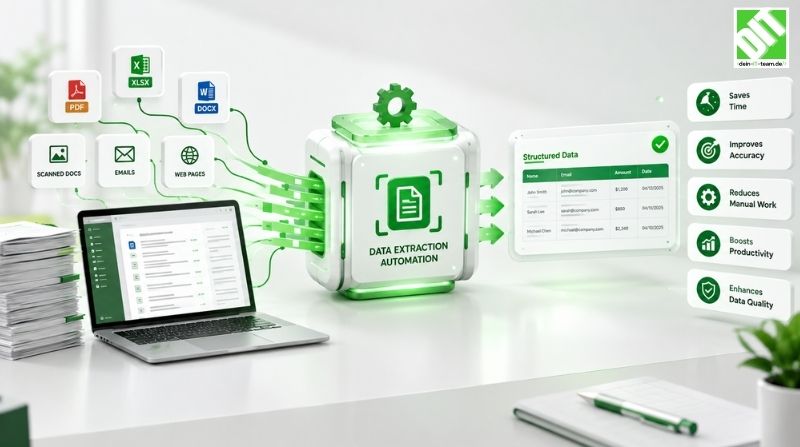
Data extraction automation automatically extracts data from documents using AI. Discover benefits, use cases and implementation best practices today.
Data extraction automation represents a critical capability for businesses struggling to process vast quantities of unstructured data efficiently. Every day, organizations across industries battle with overwhelming data volumes trapped in documents, emails, images, PDFs and various other formats. Manual data extraction consumes enormous time, introduces errors and prevents employees from focusing on strategic work that drives business value.
Data extraction automation uses software tools and intelligent systems to automatically identify, extract and transfer relevant information from multiple sources into structured formats for analysis and processing. Rather than manually reading documents and typing data into systems, automation platforms scan documents, recognize patterns and extract information automatically. Artificial Intelligence powers modern extraction systems enabling understanding of complex document structures and context, making decisions about what data matters and how to categorize it appropriately.
Data extraction automation encompasses various technologies from simple regex pattern matching to sophisticated machine learning models trained on millions of documents. OCR technology reads text from scanned documents. Machine learning models learn to identify specific fields and data points. Natural language processing understands context from unstructured text. Computer vision recognizes tables, forms and structured layouts within documents. Integration of these technologies creates intelligent systems that extract data from virtually any document format with minimal configuration.
This comprehensive guide explores data extraction automation in depth examining practical benefits, real-world use cases, implementation approaches and best practices. Whether your organization handles invoices, contracts, forms, medical records or any other document-heavy processes, understanding data extraction automation enables you to significantly improve efficiency and reduce operational costs.
Key Takeaways
Data extraction automation uses software to automatically identify and extract relevant information from documents eliminating manual data entry and improving accuracy.
Intelligent extraction powered by machine learning and AI understands document context making decisions about data categorization automatically.
Businesses implementing data extraction automation typically reduce data processing time by 70 to 90 percent freeing employees for strategic work.
Automation improves data quality through consistent extraction reducing errors introduced by manual processes.
Cost savings from data extraction automation typically range from 40 to 60 percent through labor reduction and operational efficiency improvements.
OCR technology enables extracting data from scanned documents and images making paper-based processes automatable.
Machine learning models improve continuously learning from processed documents becoming more accurate over time.
Integration with existing systems ensures extracted data flows seamlessly to destination applications without manual intervention.
Compliance documentation improves through automated extraction providing consistent audit trails and data handling records.
Scalable extraction solutions accommodate growing document volumes without proportional increases in processing costs.
Understanding Data Extraction Automation
What is Data Extraction Automation?
Data extraction automation refers to using software systems to automatically identify, locate and extract specific data elements from documents and digital content. Rather than manually reading documents and copying information into structured systems, automation platforms process documents electronically extracting relevant information automatically. This eliminates the time-consuming manual work while dramatically improving consistency and accuracy.
Data extraction automation works through multiple complementary technologies. Optical Character Recognition scans document images converting visual text into machine-readable formats. Regular expressions and pattern matching identify specific data based on defined patterns and rules. Machine learning models trained on example documents learn to recognize relevant information automatically. Natural language processing understands context from unstructured text determining what information matters. Template-based approaches work for highly structured documents with consistent layouts.
The scope of data extraction extends across numerous business processes. Invoice processing extracts vendor information, invoice numbers, amounts and line items. Contract analysis extracts key terms, obligations and dates. Form processing captures information entered across various form types. Medical record processing extracts patient information, diagnosis codes and treatment details. Customer onboarding extracts information from applications and supporting documents. Insurance claim processing extracts claim details and supporting documentation.
Why Automation Matters for Data Extraction
Data extraction represents one of the most time-consuming tasks in document-heavy business processes. Analyzing thousands of documents manually requires enormous labor. Employees spend days or weeks reading documents line by line typing information into systems. This tedious work creates high error rates as attention lapses through repetitive tasks. Critical deadlines often slip due to manual processing bottlenecks.
Quality problems from manual extraction compound throughout downstream processes. Typos in extracted data corrupt analytics. Misclassified information ends up in wrong categories. Missing data creates gaps affecting decisions. These errors require rework and correction consuming additional time and resources. The longer extraction errors persist before detection the more costly the corrections become.
Regulatory compliance places additional pressure on extraction processes. Financial regulations require accurate transaction data. Healthcare laws mandate specific documentation standards. Insurance regulations require complete claim information. Manual processes struggle meeting these requirements with consistency. Compliance violations carry significant penalties making automation increasingly critical.
Competitive pressure intensifies as companies leverage automation gaining efficiency advantages. Competitors processing documents faster reach market first. Companies with automated extraction respond quickly to customer requests. Automated systems extract insights from documents competitors miss. Organizations lacking automation gradually lose competitive position.
How Data Extraction Automation Works
Optical Character Recognition Technology
OCR technology represents the foundation for extracting data from scanned documents, images and PDFs containing text as images rather than machine-readable text. OCR systems analyze document images identifying characters and converting visual representations into text. Modern OCR powered by deep learning achieves accuracy rates exceeding 99 percent for high-quality documents. Handwritten text recognition requires more sophisticated approaches but now achieves sufficient accuracy for many business applications.
Document preprocessing improves OCR accuracy before extracting text. Image enhancement increases clarity improving character recognition. Skew correction straightens tilted documents. Noise removal eliminates background artifacts. Binarization converts images to black and white improving text contrast. These preprocessing steps dramatically improve extraction accuracy.
Layout analysis identifies document structure organizing extracted text appropriately. Table detection recognizes tabular data maintaining row and column relationships. Column detection organizes text into appropriate columns. Paragraph identification groups related lines together. This structural understanding maintains document organization through extraction.
Machine Learning for Intelligent Extraction
Machine learning models trained on example documents learn patterns enabling automatic identification of relevant information. Models trained on thousands of invoices learn to recognize vendor names, invoice numbers and amounts regardless of document layout variations. Contracts processed through machine learning identify obligations and dates despite varying terminology and phrasing. Medical records processed through learning models extract diagnosis codes and treatment information automatically.
Transfer learning accelerates model training using pre-trained models as starting points. General document understanding models build over millions of documents then customize for specific document types. This approach dramatically reduces the training data required for new extraction tasks. Organizations can deploy new extraction models in weeks rather than months.
Active learning improves models efficiently by identifying uncertain predictions requiring human review. When models encounter documents similar to those in training data they extract with confidence. When documents differ from training examples models flag uncertain extractions for human verification. Humans verify predictions training the model on challenging cases. This approach focuses human effort on difficult cases where value of correction is highest.
Natural Language Processing and Context Understanding
Natural language processing enables extracting meaning from unstructured text understanding context and relationships. Simple extraction captures text but NLP understands what text means. Extracted text "John Smith" becomes understood as a person name. Text describing activities becomes understood as actions. This contextual understanding enables intelligent categorization and relationship extraction.
Semantic analysis identifies relationships between extracted entities. Recognizing that extracted text describes someone as "Vice President of Sales" understands this person holds a specific role. Identifying that extracted text mentions "defect rate of 5 percent" understands this as a quality metric. Recognizing relationships between entities enables extracting not just individual data points but structured information about how entities relate.
Dependency parsing analyzes sentence structure identifying which words relate to each other. This enables extracting complex information from single sentences. A sentence describing "John Smith manages the sales team in Chicago" enables extracting multiple related facts: the person (John Smith), their role (manager), their team (sales), their location (Chicago). Without dependency parsing only individual words get extracted losing relationships between information.
Template and Rule-Based Extraction
Template-based extraction works effectively for highly structured documents with consistent layouts like tax forms or standard invoices. Templates define where specific information appears in documents and how to identify it. Fixed position templates extract information from specific coordinates. Relative position templates find anchor text then extract information at offsets from anchors. Both approaches enable rapid extraction of structured documents.
Regular expression patterns identify data based on specific formats. Phone numbers matching specific digit patterns. Email addresses matching standard format. Dates conforming to specific formats. Account numbers matching company format standards. These patterns enable identifying information that might appear anywhere in documents. Combining multiple patterns enables extracting complex data like structured addresses.
Keyword-based extraction searches for specific terms identifying relevant sections then extracting associated information. Finding "invoice total" then extracting the numerical value following it. Searching for "patient name" then extracting the associated name. Finding "policy number" then extracting the policy identifier. This approach works well when searched keywords reliably indicate data location.
Key Benefits of Data Extraction Automation
Dramatic Labor Cost Reduction
Data extraction automation eliminates time-consuming manual extraction work. Organizations typically reduce extraction labor by 70 to 90 percent through comprehensive automation. Employees freed from extraction can focus on higher-value work including data analysis and decision-making. Manual extraction consumes 20 to 40 percent of administrative employee time in document-heavy organizations.
The financial impact extends beyond direct labor savings. Contractors hired temporarily for extraction work become unnecessary. Overtime expenses from bottlenecks disappear when automation processes documents continuously. Reduced rework from correction errors eliminates waste. Organizations typically achieve positive ROI within 6 to 12 months from labor savings alone.
Redeployed employees generate greater business value. Accounts payable specialists can perform analytical work on spending patterns rather than invoice data entry. Medical records staff can focus on patient care support rather than data typing. Customer service representatives can handle complex inquiries rather than data extraction. Strategic value from redeployed employees often exceeds extraction automation ROI.
Improved Data Quality and Consistency
Manual extraction introduces errors at rates of 2 to 5 percent per keystroke. For high-volume operations this translates to massive error volumes. Automation eliminates keystrokes eliminating the primary error source. Data extracted directly from source documents maintains consistency throughout processing.
Validation rules applied during extraction ensure data meets required formats and business standards. Invalid entries get flagged for review rather than corrupting downstream systems. Duplicate detection identifies and handles multiple extraction instances for same content. Standardization rules ensure consistent formatting across all extracted data.
Quality improves over time as machine learning models train on more documents. Initial extraction accuracy often reaches 80 to 90 percent. After processing thousands of documents accuracy often exceeds 95 to 99 percent. Models improve continuously reducing manual review requirements over time.
Faster Processing and Improved Turnaround Times
Automated extraction completes in a fraction of manual work time. Systems process thousands of documents overnight. Real-time extraction processes documents as they arrive. What previously required days or weeks of manual work completes in hours.
Faster processing enables improved customer service. Invoices process immediately accelerating payment cycles. Insurance claims process faster enabling quicker settlements. Customer applications process instantly enabling faster decisions. The organization gains competitive advantage through faster response times.
Cloud integration services ensure extracted data flows seamlessly through business systems enabling end-to-end process acceleration. Integration from extraction through downstream processing eliminates manual steps between systems.
Better Compliance and Audit Trails
Automated extraction creates complete audit trails documenting when data was extracted and how. Timestamp records show extraction timing. System records document extraction confidence and any manual corrections. This documentation supports compliance requirements and audit investigations.
Compliance automation prevents violations through extraction validation. Business rule enforcement ensures extracted data meets regulatory requirements. Data classification ensures sensitive information receives appropriate handling. Encryption protects extracted data throughout processing. Extraction automation supports rather than complicates compliance.
Archive and retention automation manages extracted data throughout its lifecycle. Extracted data automatically moves to appropriate storage based on content type. Retention policies automatically delete data after specified periods. Audit logs track all access and modifications to extracted data. These capabilities satisfy regulatory requirements automatically.
Scalability Without Proportional Cost Increase
Organizations can scale extraction to handle substantially higher volumes with minimal cost increase. Adding another extraction instance costs a small fraction of hiring extraction staff. Processes that previously maxed out at team capacity now scale seamlessly. Growth no longer requires proportional increases in extraction overhead.
Cloud-based extraction scales automatically accommodating variable volumes. Quiet periods use minimal resources. Peak periods automatically scale up handling volume spikes. Organizations pay only for resources actually consumed. This elasticity enables handling unexpected volume increases without infrastructure investment.
Real-World Use Cases for Data Extraction Automation
Invoice Processing and Accounts Payable
Invoice processing represents the largest use case for data extraction automation. Organizations process millions of invoices annually from hundreds of vendors with varying formats. Automated extraction captures vendor information, invoice numbers, dates, line items and amounts from diverse invoice layouts.
Extracted invoice data flows directly to accounting systems creating purchase orders and recording payables. Manual invoice processing takes 20 to 30 minutes per invoice. Automated extraction completes in seconds. Accelerated processing enables faster payment cycles and improved vendor relationships.
Three-way matching comparing invoices to purchase orders and receipts benefits from automated extraction. Matching accuracy improves from consistent extraction eliminating data entry typos. Discrepancy detection identifies mismatches enabling resolution before payment. Payment automation can occur immediately after successful matching.
Contract Analysis and Management
Contract processing traditionally requires lawyers manually reading contracts identifying key terms, obligations and dates. This manual process consumes significant legal resources. Extraction automation identifies key contract elements automatically enabling contract management systems to track obligations and deadlines.
Clause extraction identifies specific contractual obligations. Automatic identification of renewal dates enables proactive management. Detection of termination clauses helps identify contract exit opportunities. Pricing term extraction enables spend analysis across contracts.
Risk identification through extraction flagging high-risk contract language. Automatic detection of liability limitations identifies potential exposure. Non-compete clause extraction identifies workforce restrictions. Confidentiality term extraction ensures compliance with data protection obligations.
Medical Records and Healthcare Processing
Healthcare organizations process millions of medical records requiring extraction of patient information, diagnosis codes, treatment details and insurance information. Manual extraction of medical records represents enormous labor. Automated extraction processes records immediately enabling faster care delivery.
Insurance claim processing benefits from automated extraction of patient demographics, diagnosis codes and treatment information. Claims process faster improving patient financial outcomes. Coding accuracy improves through consistent extraction reducing claim denials from coding errors.
Insurance Claims Processing
Insurance claims require extraction of claimant information, incident details, coverage terms and supporting documentation. Automated extraction accelerates claims processing enabling faster settlements improving customer satisfaction.
Fraud detection benefits from automated extraction enabling analysis of patterns suggesting fraudulent claims. Inconsistent information extraction enables identifying suspicious claims. Automated comparison across claims enables detecting duplicates suggesting fraud.
Implementing Data Extraction Automation
Assessing Current Extraction Processes
Start by mapping current data extraction work identifying high-volume, repetitive tasks. Analyze labor costs and processing times. Identify documents with consistent structures amenable to automation. Evaluate error rates and rework required.
Calculate potential savings from eliminating manual extraction. Consider not just direct labor savings but reduced error correction and improved processing speed enabling faster customer response.
Selecting Appropriate Extraction Technology
Match extraction technology to specific requirements. Highly structured documents benefit from template-based approaches. Unstructured documents benefit from machine learning. Mixed formats benefit from hybrid approaches combining multiple technologies.
Consider integration requirements with existing systems. Evaluate scalability to accommodate growth. Assess security and compliance capabilities. Consider whether organization has internal expertise or requires external support.
Building and Training Extraction Models
Start with pilot implementations testing extraction on subset of documents. Pilots identify technology limitations and training requirements. Phased rollout enables learning and optimization before full deployment.
Develop training datasets from representative examples. Quality training data dramatically improves model accuracy. Organize training data by document type enabling specialized models. Continuously update training data with difficult examples improving performance.
Deployment and Monitoring
Deploy extraction systems carefully monitoring performance. Compare automated extraction against manual extraction on samples. Identify high-error cases requiring model improvement. Gradually increase confidence thresholds as model accuracy improves.
Monitor extraction quality metrics identifying trends. Establish exception handling procedures for uncertain extractions. Create feedback loops enabling continuous model improvement.
Common Data Extraction Challenges
Handling Document Variations
Real-world documents rarely match expected formats perfectly. Vendor invoices vary dramatically in layout. Contracts use different terminology describing same concepts. Medical records use varied formatting. Document variations challenge extraction systems trained on limited examples.
Solution involves training models on diverse examples capturing variation. Active learning identifies challenging variations requiring human review and model training. Template flexibility accommodates layout variations automatically.
Low-Quality Source Documents
Scanned documents with poor quality reduce OCR accuracy. Handwritten text recognition remains challenging. Faded or damaged documents lose readability. These quality issues propagate through extraction reducing accuracy.
Solution involves document preprocessing improving quality before extraction. Image enhancement increases clarity. High-resolution scanning improves text recognition. Hybrid human-machine approaches with human review of uncertain extractions maintain quality.
Complex Document Structures
Some documents combine multiple formats within single documents. Invoices with mixed text and table structures. Contracts with footnotes and appendices. Medical records combining structured forms and narrative text. These complex structures challenge extraction systems.
Solution involves segmentation approaches identifying document sections then applying appropriate extraction to each section. Recursive processing handles documents containing other documents. Custom logic handles document-specific complexity.
Language and Terminology Variations
Documents use varied terminology describing same concepts. Different vendors describe identical products using different names. Contracts describe similar obligations using different language. Medical records use varied terminology for conditions.
Solution involves synonym mapping normalizing varied terminology to standard terms. Training models on diverse terminology examples. Natural language processing understanding semantic similarity despite terminology variations.
Custom software development services build tailored extraction solutions addressing unique organizational document processing requirements beyond standard platform capabilities.
Advanced Data Extraction Techniques
Intelligent Document Preprocessing
Advanced preprocessing improves extraction accuracy through sophisticated image processing. Deskewing corrects document tilt. Dewarping corrects curved pages from photocopying. Binarization improves text contrast. Noise reduction removes background artifacts. Ink removal separates content from colored forms. These preprocessing steps dramatically improve OCR accuracy.
Page segmentation identifies document regions organizing content appropriately. Column detection maintains multi-column text structure. Table detection preserves tabular information. Graphics removal eliminates non-text content. This structural understanding maintains document organization through extraction.
Transfer Learning and Few-Shot Learning
Transfer learning applies knowledge from large general models to specific extraction tasks. Models trained on millions of documents learn general document understanding. Fine-tuning on specific document types adapts models efficiently. This approach enables accurate extraction with minimal organization-specific training data.
Few-shot learning trains accurate models from limited examples. Humans provide just a handful of example documents. Machine learning systems generalize from minimal examples. This approach enables organizations deploying new extraction types quickly.
Continuous Learning Systems
Continuous learning systems improve automatically as humans review and correct extractions. Each correction trains the model improving future predictions. Uncertain predictions flagged for human review become training examples. Over time model accuracy increases reducing human review requirements.
Multimodal Extraction
Modern extraction systems combine multiple data modalities improving accuracy. Text-based extraction combined with computer vision for table recognition. Language understanding combined with layout analysis. Hybrid approaches achieve accuracy exceeding any single modality alone.
Measuring Extraction Automation Success
Key Performance Indicators
Track percentage of documents extracted automatically without human intervention. Monitor extraction accuracy comparing automated results against manual verification. Measure processing time reduction from days to hours. Calculate labor hours freed for higher-value work.
Monitor cost per document tracking how extraction costs decrease as automation scales. Measure compliance metrics ensuring regulatory requirements are met. Track customer satisfaction improvements from faster document processing.
Financial Metrics
Calculate labor cost savings from reduced extraction staff and reduced overtime. Measure error cost reduction from fewer manual extraction mistakes. Calculate processing time savings enabling faster business cycles. Track productivity improvements from employees focused on strategic work.
Most organizations achieve ROI within 6 to 12 months from extraction automation. Quick-win implementations often achieve positive ROI within months. More complex implementations may require longer payback periods but deliver substantial long-term savings.
Conclusion
Data extraction automation fundamentally transforms how businesses handle document processing work. By eliminating repetitive manual extraction, organizations achieve dramatic labor cost reduction, improved accuracy and faster processing. Employees freed from extraction work can focus on strategic analysis and decision-making creating genuine business value. Automation scales seamlessly enabling handling substantially higher document volumes without proportional cost increases.
Organizations implementing data extraction automation gain competitive advantages through lower operational costs, faster processing and improved data quality. Customers experience faster service from accelerated document processing. Employees benefit from elimination of tedious extraction work enabling focus on meaningful tasks. Compliance improves through consistent accurate extraction and complete audit trails.
For deeper understanding of how extraction automation connects to broader data processing automation, explore Data Entry Automation: How Businesses Can Eliminate Repetitive Manual Work, which covers related automation approaches for repetitive data work. This comprehensive resource explains how extraction automation fits within broader organizational automation strategies.
Starting with focused pilot implementations on highest-impact documents enables demonstrating value building organizational support for broader transformation. Organizations embracing data extraction automation position themselves for sustained competitive advantage in increasingly data-driven business environments where speed and accuracy determine market leaders from slower competitors.
Frequently Asked Questions
What exactly does data extraction automation do?
Data extraction automation uses software to automatically identify, locate and extract specific information from documents and content. Rather than manually reading documents and typing data, automation platforms scan documents extract relevant information automatically and transfer it to destination systems. This eliminates time-consuming manual work dramatically improving accuracy and consistency.
What types of documents can be extracted?
Data extraction automation handles virtually any document type. Invoices, contracts, forms, medical records, insurance claims, receipts, statements and more can all be extracted. Highly structured documents like standard forms extract with highest accuracy. Unstructured documents like narrative text can be extracted with machine learning models trained on examples.
How accurate is automated extraction?
Properly implemented extraction achieves 95 to 99 percent accuracy depending on document quality and complexity. Poor quality source documents reduce accuracy. Complex unstructured documents may require higher manual review percentages initially. Accuracy improves over time as models train on more documents.
How much does extraction automation cost?
Implementation costs vary based on complexity. Simple template-based extraction might cost tens of thousands of dollars. Machine learning models require more investment. Enterprise implementations could cost hundreds of thousands. Most organizations achieve ROI within 6 to 12 months through labor savings.
Can extraction automation work with legacy systems?
Yes, extraction automation integrates with any system through APIs and data transfer methods. Custom development creates connections between extraction platforms and legacy systems. Phased integration addresses highest-priority system connections initially.
How long does extraction automation implementation take?
Simple projects might take weeks. Complex implementations could take months. Phased approaches start immediately with pilot implementations providing early benefits while full deployment expands over time.
What skills do organizations need for extraction automation?
Organizations need basic understanding of extraction concepts. Technical staff need skills connecting extraction platforms with existing systems. Managers need ability to interpret extraction quality metrics and make optimization decisions. Training programs develop necessary skills.
What document volumes justify extraction automation?
Extraction automation makes sense for any organization processing more than a few thousand documents annually manually. Lower volumes might not achieve ROI quickly. However even modest volume processing benefits from improved accuracy and consistency.
How does extraction automation improve compliance?
Automated extraction creates complete audit trails documenting extraction timing and confidence. Business rule validation ensures extracted data meets regulatory requirements. Data classification ensures sensitive information receives appropriate handling throughout processing.
How do I get started with extraction automation?
Assess current extraction work identifying high-volume, repetitive processes. Evaluate document types and formats. Select pilot documents for testing. Evaluate extraction technologies against requirements. Start with pilots demonstrating value before broader deployment.
Recent Posts

October 13, 2026
October 13, 2026

October 14, 2026