What is Backup Automation? Benefits, Types, and Best Practices for 2026
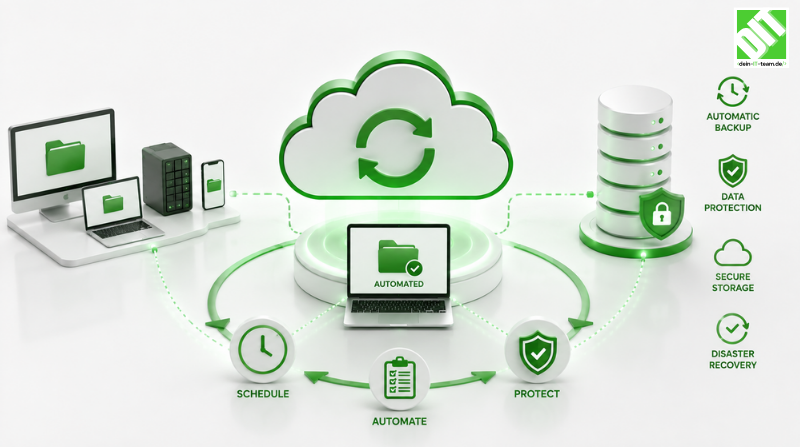
Learn what backup automation is, its key benefits, architectures, and best practices to protect enterprise data and prevent ransomware loss.
Modern enterprise IT environments operate under a simple reality: data volume is exploding, cyber threats are becoming more sophisticated, and human intervention in routine tasks is a primary point of failure. Manual data backups—once managed via static scripts, tapes, or scheduled operator checklists—can no longer keep pace with cloud-native architectures, multi-cloud deployments, and continuous delivery models.
Enter Backup Automation. This comprehensive guide explores what backup automation is, why it has become mandatory for business continuity, the different types of automated backup architecture, and the modern best practices required to build an immutable, resilient backup strategy. To see how these architectures seamlessly integrate across modern environments, explore our professional cloud integration services.
Key Takeaways
Zero-Human Intervention: Backup automation uses policy-driven software to execute, verify, and store data backups continuously without manual oversight.
Ransomware Defense: Automated systems incorporate immutability and air-gapping to prevent malware from modifying or deleting backups.
Cost & Recovery Optimization: Automating backups reduces Recovery Time Objectives (RTO) and Recovery Point Objectives (RPO) from hours to minutes while eliminating manual labor costs.
Modern Compliance: Automated verification logs provide tamper-proof audit trails for regulations like HIPAA, GDPR, and SOC 2.
What Is Backup Automation?
Backup Automation is the practice of using policy-driven software to create, copy, verify, and retain copies of critical digital assets—including databases, virtual machines, cloud instances, and SaaS application data—according to a predefined schedule and logic, without requiring human intervention.
Unlike legacy manual backups where an engineer manually triggers a dump script or swaps physical storage drives, automated backup systems continuously monitor system states, capture incremental snapshots, run automated integrity checks, and enforce retention policies across multi-cloud and on-premises environments.
Why Backup Automation is Critical
Organizations that rely on manual backup workflows face significant operational and financial risks:
Human Error & Inconsistency: Manual tasks get forgotten, delayed, or misconfigured. A single missed backup window during an operational sprint can leave critical production data unprotected.
The Cost of Unplanned Downtime: According to industry benchmarks, an hour of enterprise downtime costs organizations between $100,000 and $300,000+. Manual recovery processes compound this cost by taking hours—or days—to restore systems.
Aggressive Ransomware Threats: Modern ransomware specifically targets online backups. Automated systems enforce air-gapping, encryption, and write-once-read-many policies to ensure recovery vaults remain untouched.
Automating this entire lifecycle enables organizations to optimize two fundamental Disaster Recovery metrics:
Recovery Point Objective (RPO): The maximum acceptable amount of data loss measured in time.
Recovery Time Objective (RTO): The maximum target time allowed to restore operations after a disruption.
Types of Backup Automation Architectures
Backup automation is not a one-size-fits-all solution. Depending on your infrastructure, automation can be categorized across four main technical patterns:
Continuous Data Protection (CDP): Continuous Data Protection automatically logs every data change instantaneously to a backup target. This pattern is primarily used for mission-critical transactional databases such as SQL or Oracle, offering the key advantage of near-zero RPO and instantaneous point-in-time recovery.
Snapshot-Based Automation: Snapshot-Based Automation takes point-in-time state captures of block storage or virtual instances at scheduled intervals. It is best suited for cloud virtual machines like AWS EC2 or Azure VMs and Kubernetes persistent volumes, delivering lightweight execution with minimal impact on production systems.
Cloud-to-Cloud Automation: Cloud-to-Cloud Automation automatically backs up SaaS vendor data to an isolated cloud environment. This architecture protects SaaS applications like Microsoft 365 or Salesforce, preventing data loss caused by accidental user deletion or vendor API disruptions.
Automated Cold and Tiered Storage: Automated Cold Storage moves older backups automatically from hot storage to low-cost archive storage. It is ideal for long-term compliance and historical audit retention, drastically reducing cloud storage costs over extended retention windows.
Key Benefits of Backup Automation
Implementing automated backup management unlocks measurable operational and strategic advantages:
Eliminates Manual Errors and Fatigue: Manual tasks lead to configuration drift and skipped backup windows. Automated pipelines execute flawlessly according to defined cron schedules or event triggers, eliminating human dependencies.
Rapid RTO and RPO Realization: When disaster strikes, automated restoration workflows spin up virtual machines and restore database schemas automatically. Teams do not waste precious time manually mounting drives or extracting raw tarballs.
Automated Integrity Testing & Validation: A backup is only as good as its restore capability. Modern automated backup software executes continuous sandbox restore tests—booting up the backed-up VM or database in an isolated container to verify that data is not corrupt—sending automated health signals to IT teams.
Continuous Compliance & Audit Readiness: Regulations like HIPAA, GDPR, SOC 2, and PCI-DSS mandate strict data retention, encryption, and audit history. Automated systems log every backup, snapshot, and restore attempt, generating instant audit reports for compliance teams.
Core Technical Components of an Automated Backup System
An enterprise-grade automated backup solution consists of several integrated layers:
Policy Engine: Allows administrators to define SLA-driven policies regarding retention windows and frequency schedules.
Orchestration & Trigger Layer: Triggers backup execution via system cron, API endpoints, or event streams before or after critical environment changes.
Encryption Engine: Automatically encrypts data in transit via TLS and at rest via AES-256 before it reaches the backup destination.
Deduplication & Compression: Identifies duplicate data blocks automatically across systems to optimize bandwidth usage and reduce cloud storage expenses.
Monitoring & Alerting Gateway: Integrates with modern observability platforms to notify engineers instantly if a backup job fails.
Best Practices for Implementing Backup Automation
To build a reliable, fail-safe backup automation framework, adopt these industry-proven best practices:
Implement the Modern 3-2-1-1-0 Rule: The classic 3-2-1 strategy has evolved to address modern cyber threats—3 copies of your data (1 primary, 2 backups), 2 different storage media types, 1 offsite location, 1 immutable/air-gapped copy that cannot be modified, and 0 errors after automated restore verification.
Shift Left (Integrate Backups into CI/CD Pipelines): Do not treat backups purely as an operational afterthought. Integrate backup automation directly into your software delivery toolchain. For instance, read our comprehensive guide on deployment automation benefits, challenges, and best practices to learn how to automatically trigger database snapshots before initiating production releases.
Leverage Infrastructure as Code (IaC): Define your backup policies declaratively using infrastructure management tools. Defining backup vault rules, snapshot schedules, and access policies as code ensures consistency across development, staging, and production environments.
Enforce Zero-Trust Access & Least Privilege: Protect your backup management interfaces with strict Multi-Factor Authentication and Role-Based Access Control. Ensure that backup deletion actions require explicit multi-party approval to prevent rogue employees or compromised admin credentials from wiping out recovery options.
How to Choose the Right Backup Automation Tool
When evaluating commercial or open-source backup automation tools, evaluate solutions based on critical criteria:
Multi-Environment Support: Does the software cover hybrid cloud, multi-cloud, and legacy on-premises infrastructure?
SaaS Application Protection: Can it automatically protect workspace platforms and cloud apps?
Automated DR Orchestration: Does it offer 1-click failover capabilities, or does it only back up cold data?
API First Architecture: Does the tool expose robust APIs allowing custom integrations into internal developer portals and alerting stacks?
Conclusion
Implementing robust backup automation is no longer optional for modern enterprises aiming to minimize operational downtime and protect critical assets against evolving security threats. By replacing manual workflows with policy-driven orchestration, automated verification, and immutable storage layers, organizations achieve reliable recovery objectives while maintaining strict regulatory compliance. Partner with our dedicated enterprise team for tailored DevOps services to implement seamless backup pipelines across your infrastructure.
Frequently Asked Questions (FAQ)
What is the difference between manual backups and backup automation? Manual backups rely on human operators to execute scripts, swap drives, or schedule jobs manually, making them prone to human error and delays. Backup automation uses software policies to trigger, verify, log, and manage the entire backup lifecycle automatically without human intervention.
How does backup automation help defend against ransomware? Automated backup systems incorporate immutability and air-gapping. Because the backup policies run automatically on isolated schedules with strict access controls, ransomware running on production servers cannot encrypt or delete the immutable backup vaults.
What is automated backup verification? Automated backup verification is a feature where the backup software automatically spins up an isolated sandbox environment, restores the backup data, performs health and integrity checks, and confirms that the data is functional without human involvement.
Can cloud infrastructure be backed up automatically? Yes. Major cloud providers supply native backup automation services that utilize declarative policies to automate snapshot management, cross-region replication, and lifecycle tiering across cloud services.
How does backup automation impact Recovery Time Objective (RTO)? Backup automation drastically reduces RTO from hours or days to minutes by eliminating manual steps like mounting drives or manual database restoration, replacing them with automated orchestration scripts.
What is continuous data protection (CDP) in backup automation? Continuous data protection is an automated backup model that records every change made to a dataset instantly, enabling organizations to restore systems to the exact second right before a failure or attack occurred.
How does automated backup management support compliance auditing? Automated systems generate tamper-proof logs for every backup creation, snapshot, and restore test. These automated reports serve as direct audit evidence for standards like HIPAA, GDPR, and SOC 2.
Does backup automation reduce cloud storage costs? Yes. Automated backup systems use built-in deduplication, compression, and automated lifecycle policies to transition older snapshots automatically to lower-cost cold storage tiers.
What role does Infrastructure as Code play in backup automation? Infrastructure as Code allows teams to define backup rules, retention schedules, and vault configurations in code files, ensuring automated, identical backup configurations across all environments.
What happens if an automated backup job fails? When an automated backup job fails, the system automatically triggers alerts via integrated monitoring tools like PagerDuty or Slack and can initiate automated retry logic based on preconfigured operational policies.
Recent Posts

October 13, 2026