

TECHNICAL SYSTEMS INTEGRATION: BENEFITS, CHALLENGES, AND BEST PRACTICES
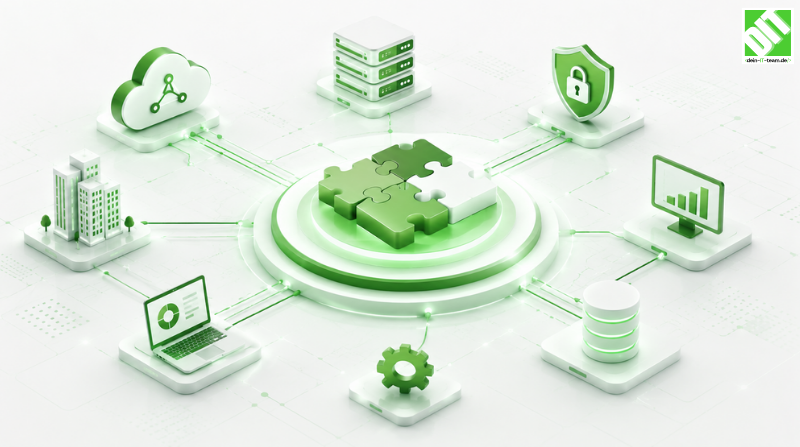
Master technical systems integration. Learn how to eliminate data silos, reduce manual work by 70-80% and achieve seamless system connectivity.
Technical systems integration has become critical for organizations managing multiple software applications across their operations. Most enterprises use dozens of separate systems—accounting software, CRM platforms, ERP solutions, HR management tools, project management systems. These applications create data silos when not properly integrated. Information exists in multiple places, teams manually transfer data between systems and organizations struggle to achieve complete visibility into operations. Technical systems integration solves these problems by connecting disparate systems enabling seamless data flow.
The difference between poorly integrated systems and well-integrated systems dramatically impacts organizational efficiency. Poor integration creates duplicate data entry, manual workarounds and information gaps. Employees waste time copying data between systems. Decisions get made with incomplete information. Errors propagate through disconnected systems causing downstream problems. Well-integrated systems eliminate these issues through automated data flow, unified information access and consistent business processes across platforms.
This comprehensive guide walks you through technical systems integration. What integration accomplishes. Why it matters for business success. Architecture patterns enabling integration. Technology components that power modern integration. Implementation strategies that work. Common obstacles and proven solutions. Measurable business benefits. Real-world examples showing transformation. By the end, you'll understand exactly how to plan, implement and manage technical systems integration delivering substantial organizational value.
Key Takeaways
Technical systems integration eliminates data silos, reduces manual data entry by 70-80% and improves operational efficiency significantly.
Successful integration requires more than technology—organizational change management and clear business objectives determine outcomes.
API-first architecture enables flexible, scalable integration supporting organizational growth and technology changes.
Cloud-based integration platforms offer superior flexibility, scalability and faster deployment compared to on-premise solutions.
Real-time data synchronization across systems improves decision-making and enables businesses to respond to market changes instantly.
Integration reduces errors from manual data transfer while improving data consistency across the organization.
Middleware solutions and integration platforms simplify connecting legacy systems to modern cloud applications.
Organizations combining systems integration with process optimization realize benefits exceeding expectations from technology alone.
Proper integration governance ensures data quality, security and compliance throughout integrated systems.
Successful integration requires phased implementation, comprehensive testing and ongoing monitoring for sustained value.
What Is Technical Systems Integration?
Understanding Systems Integration
Technical systems integration connects separate software applications enabling them to communicate, share data and work together seamlessly. Integration allows data created in one system to automatically flow to other systems that need it. When a customer record updates in the CRM, accounting, shipping and support systems automatically reflect the change. Invoices generated in accounting automatically flow to banking systems for payment processing. Purchase orders created in procurement automatically update inventory systems. This automation eliminates manual data transfer, ensures consistency and enables real-time visibility.
Integration ranges from simple point-to-point connections between two systems to complex enterprise-wide ecosystems connecting dozens of applications. Simple integrations might use direct database connections or file transfers. Complex integrations use middleware, APIs and integration platforms orchestrating data flow across many systems. Organizations should implement integration complexity matching their actual requirements rather than assuming maximum complexity is always necessary.
Systems integration affects how people work. When systems are properly integrated, employees access needed information without switching between applications. Workflows span multiple systems seamlessly. Data entered once propagates everywhere automatically. This integration reduces work, improves accuracy and enables focus on strategic activities rather than data management.
Why Systems Integration Matters
Organizations using unintegrated systems face significant costs and inefficiencies. Manual data entry between systems wastes employee time. Studies show information workers spend 20-30% of time managing data rather than using it. Errors from manual transfer create downstream problems requiring correction. Duplicate data in multiple systems creates confusion about which version is correct. Poor visibility means decisions rely on incomplete information. These problems compound as organizations grow and add more systems.
Integration solves these problems by creating unified systems where data flows automatically. Manual entry decreases dramatically. Errors from manual transfer disappear. Data stays consistent across systems. Information becomes complete and accessible. Organizations processing the same work in fraction of the time with fewer errors and better information enables competitive advantage.
Beyond efficiency, integration enables strategic capabilities. Real-time dashboards showing business metrics across all systems become possible. Automated workflows spanning multiple applications streamline complex processes. Predictive analytics on complete data enable anticipating problems before they occur. These capabilities separate competitive organizations from those struggling with disconnected systems.
How Technical Systems Integration Works
Integration Architecture Patterns
Integration architecture determines how systems connect and communicate. Point-to-point integration connects two systems directly. This approach works for simple cases but becomes unmanageable as systems multiply. Each new system requires building connections to every existing system creating exponential complexity.
Hub-and-spoke architecture introduces a central integration platform acting as intermediary. All systems connect to the hub rather than directly to each other. This simplifies adding new systems—you connect to the hub rather than building connections to all existing systems. The hub handles data transformation, routing and orchestration. This approach scales better than point-to-point but still creates a central point of failure.
API-based architecture enables systems to communicate through standardized interfaces. Applications expose their data and functionality through APIs. Other applications consume these APIs retrieving or updating data. This approach provides flexibility allowing organizations to change implementations without breaking integrations. New systems can adopt APIs without rebuilding connections to existing systems.
Microservices architecture breaks applications into small independent services communicating through APIs. Each service handles specific business function. Services can be updated independently without affecting others. This approach provides maximum flexibility enabling rapid changes and scaling but requires sophisticated architecture and operational capabilities.
Data Integration Methods
Integration transfers data between systems using various methods depending on requirements. File transfer involves exporting data from one system and importing into another. This method works for periodic updates but doesn't enable real-time synchronization. Batch processing runs scheduled jobs transferring data at set intervals—nightly, hourly or more frequently depending on requirements. This approach works well when real-time synchronization isn't necessary.
Real-time integration continuously synchronizes data as changes occur. Message queues buffer data ensuring reliable delivery even when systems temporarily go offline. Stream processing handles continuous data flows transforming and routing to appropriate systems. Event-driven integration triggers data transfers when specific events occur—customer created, order placed, invoice generated. This approach enables responding instantly to business events.
API integration uses application programming interfaces to request or push data between systems. Pull integration means one system asks another for data when needed. Push integration means one system sends data to another automatically. APIs provide flexible, standardized integration supporting complex transformations and conditional logic.
Data Transformation and Mapping
Different systems store data differently. The CRM might store customer name as "FirstName" and "LastName" fields while accounting stores it as "CustomerName". Integration must transform data from source format to target format. Mapping defines how source fields correspond to target fields. Transformation logic handles converting data when formats don't match directly.
Transformation complexity varies. Simple transformations concatenate or split fields. Complex transformations apply business logic—calculating totals, determining tax amounts, assigning cost centers. Sophisticated systems use transformation engines supporting conditional logic, lookups and calculations. Poor transformation leads to data integrity issues. Good transformation ensures data quality across systems.
Master data management ensures single versions of truth for critical data. Customer records, product catalogs, vendor lists and chart of accounts should exist once referenced by all systems. When master data changes, all systems see the update automatically. This approach prevents duplicate customer records, inconsistent product information and accounting mismatches causing audit issues.
Benefits of Technical Systems Integration
Operational Efficiency
Integration dramatically reduces manual work. Eliminating manual data entry between systems frees employees to focus on value-added work. Organizations typically save 15-25 hours per employee weekly through reduced data management. For organizations with hundreds of employees, this represents thousands of hours monthly—equivalent to dozens of full-time positions worth of work.
Process automation spans systems seamlessly. When customer order arrives in order management system, integration automatically creates corresponding invoice in accounting, updates inventory and notifies warehouse to pick and ship. This workflow that might take hours manually completes in minutes automatically. Organizations handle higher transaction volumes with existing staff.
Decision-making accelerates. Dashboards consolidate data from multiple systems providing complete picture instantly. No need gathering reports from different teams who each manage their own system. Real-time visibility means decisions happen immediately rather than waiting for end-of-month reporting.
Improved Data Quality and Accuracy
Manual data entry introduces errors. Studies show manual keying has 0.1-1% error rate depending on complexity. Integration eliminates data entry errors through automated transfer. Data captured once in source system propagates accurately everywhere else.
Validation rules built into integration check data quality before transfer. Duplicate detection prevents entering same customer or vendor twice. Reference validation ensures coding to valid GL accounts and cost centers. Completeness checks ensure required fields contain data. These automated checks catch errors at source preventing propagation.
Data consistency improves dramatically. When information exists in single location and flows automatically to other systems, nothing becomes out of sync. Accounting always matches operations. Inventory reflects what shipping says. Customer information is consistent across sales, support and finance.
Enhanced Decision-Making
Integration provides complete information for better decisions. Previously, executives might rely on accounting data unaware of current operations status. With integration, dashboards show accounting, operations and customer data together. Leaders understand complete business picture making better decisions.
Real-time data enables faster response. When dashboards show sales declining, operations can reduce production immediately. When inventory dips below threshold, procurement initiates orders automatically. Organizations respond to changes as they happen rather than discovering problems weeks later in end-of-month reports.
Predictive analytics become possible on complete data. Combining historical sales with current inventory and pending orders enables forecasting accurately. Combining customer behavior with financial data enables identifying churn risks. These insights enable proactive decision-making preventing problems.
Scalability and Flexibility
Integrated systems scale more easily than disconnected ones. Adding new customers, products or transactions doesn't require proportional headcount increase. Automated processes handle volume growth with existing infrastructure. Custom software development builds scalable solutions supporting organizational growth.
Technology flexibility improves. When systems integrate through APIs, replacing one system doesn't require rebuilding connections to all others. New systems can adopt standard APIs without custom work. This flexibility enables adopting better solutions when they emerge rather than staying locked into suboptimal systems.
Geographic scaling becomes feasible. Multi-location organizations can consolidate operations through integration. Each location uses local systems if needed but data consolidates centrally for reporting and decision-making. Global organizations gain visibility across all locations despite different systems.
Implementation Strategies for Systems Integration
Assessing Current State and Defining Objectives
Successful integration begins by understanding current systems landscape. What systems currently exist? What data lives where? Which systems interact and how? What manual processes currently compensate for system gaps? What are biggest pain points? Comprehensive assessment reveals priorities.
Define clear business objectives. Do you want cost reduction through eliminating manual work? Do you want faster decision-making through real-time visibility? Do you want improved data quality? Do you want scalability to support growth? Do you want better customer experience through faster service? Different objectives drive different integration priorities.
Identify which integrations provide biggest value. Not all integrations matter equally. Some provide significant cost savings or revenue opportunities. Others provide smaller benefits. Prioritizing high-value integrations enables focusing limited resources where impact is greatest.
Selecting Integration Approach and Technology
Organizations choose between building custom integrations versus purchasing pre-built solutions. Custom integrations provide maximum flexibility for unique requirements but cost more and take longer. Pre-built connectors between common systems offer quick deployment but less customization. Most organizations combine both—pre-built connectors for standard systems and custom development for unique requirements.
Cloud integration services offer advantages over on-premise solutions. Cloud platforms scale automatically handling growth. Updates happen automatically maintaining compatibility. Hosting is managed eliminating infrastructure headaches. Security and compliance expertise is built in. Most organizations benefit from cloud-based platforms.
Evaluate integration platforms carefully. Can the platform connect to your systems? Does it support your data volume? Does it handle real-time or batch transfer well? What's the cost model? Can you handle operational requirements? Making right choice prevents expensive false starts.
Designing Integration with Proper Governance
Integration governance ensures quality, security and compliance. Data ownership defines who is responsible for data accuracy. Integration governance defines who can access data and what transformations are allowed. Security policies define encryption, authentication and authorization requirements. Compliance requirements—regulatory, audit—must be met.
Master data governance ensures single versions of truth. Who maintains customer master data? How are disputes about customer information resolved? How are new products added to master data? Clear governance prevents chaos when different systems try to update same data.
Error handling procedures ensure problems get resolved quickly. What happens when integration fails? How are inconsistencies detected and corrected? Who investigates problems? Clear procedures prevent problems cascading.
Phased Implementation and Testing
Attempting to integrate everything simultaneously overwhelms teams and increases risk. Phased implementation enables learning and adjustment. Many successful implementations start with integrations providing clear value—connecting accounting to banking systems or order management to inventory. Early success builds confidence for later, more complex integrations.
Comprehensive testing catches problems before production. Unit testing validates individual transformations work correctly. Integration testing verifies systems communicate properly. User acceptance testing ensures changes work for actual users. Performance testing ensures systems handle production volumes. Thorough testing prevents expensive production problems.
Pilot implementation with subset of data or users enables proving approach works before full rollout. Pilots identify issues requiring adjustment. Pilot successes provide proof points demonstrating value gaining stakeholder support for broader rollout.
Common Systems Integration Challenges
Legacy System Constraints
Many organizations must integrate old legacy systems. Legacy systems often lack APIs or modern connectivity. They run on outdated platforms. Maintenance is difficult. Replacing legacy systems is expensive and disruptive. Yet legacy systems often contain critical data and functionality.
Solution: Middleware can wrap legacy systems providing modern interfaces. Custom adapters translate between legacy formats and modern standards. Strangler pattern gradually replaces legacy systems with modern alternatives while maintaining integration. Accept that legacy systems create complexity but solutions exist.
Data Quality Issues
Integration amplifies data quality problems. Garbage data in source systems propagates to all connected systems. Duplicate records create confusion. Inconsistent data causes calculation errors. Poor data quality undermines integration benefits.
Solution: Address data quality before integration. Clean source systems. Establish data governance defining standards. Implement validation rules catching bad data. Ongoing data quality management maintains integrity. Quality integration starts with quality data.
Integration Complexity
As systems multiply, integration complexity grows exponentially. Managing many integrations creates operational burden. Changes to one system can break multiple integrations. Troubleshooting problems across many systems is difficult. Organizations underestimate integration complexity.
Solution: Invest in proper architecture, governance and tooling. Automation handles routine tasks. Monitoring detects problems early. Well-designed integrations are maintainable. Experienced teams prevent problems. Integration complexity is manageable with proper approach.
Change Management Resistance
Integration changes how people work. Some employees prefer existing systems and processes. Others fear automation eliminates their jobs. Resistance slows adoption and prevents realizing integration benefits.
Solution: Communicate why integration is necessary and how it helps employees. Involve staff in design and selection. Provide training and support. Celebrate successes. Treat people well through change. Successful organizations prioritize people alongside technology.
Measuring Integration Success
Key Performance Indicators
Define metrics measuring integration impact. Time spent on manual data transfer should decrease significantly. Error rates from manual entry should approach zero. Process cycle times should improve. System uptime and reliability should increase. Customer satisfaction from faster service should improve. Measure before and after comparing actual impact.
Process automation metrics track how much work automation handles. Percentage of transactions processed automatically shows integration effectiveness. Exception rates show how many require manual review. Cost per transaction shows financial efficiency. These metrics validate integration value.
Financial Impact
Quantify financial benefits. Cost savings from reduced manual work should be clear. Revenue improvements from faster decision-making or better service should be measurable. ROI from integration investments should justify expenditure. Most organizations see positive ROI within one to two years.
Indirect benefits often exceed direct cost savings. Improved customer satisfaction leads to repeat business. Faster response to market changes enables winning business competitors miss. Better information enables smarter investments. These indirect benefits provide competitive advantage.
Conclusion
Technical systems integration has become essential for competitive organizations managing modern technology environments. Organizations effectively integrating systems see dramatic improvements—manual work decreases 70-80%, error rates drop to near zero, decision-making accelerates and scalability improves. The business case for integration is compelling.
Yet integration requires more than technology selection. Clear business objectives, proper architecture, comprehensive testing, change management and ongoing governance determine success. Organizations treating integration purely as technical implementation often disappoint. Organizations approaching integration comprehensively realize full benefits.
To understand why real-time integration matters for competitive advantage, explore Why Businesses Need Real-Time Data Integration to discover how immediate data access enables faster response and better decisions. This deeper analysis explains why integration speed matters in competitive markets.
Begin your integration journey today. Assess current state. Define objectives. Plan approach. Execute systematically. Measure results. Your connected systems will operate more efficiently, deliver better information and enable competitive advantage impossible with disconnected applications. In competitive markets, that advantage translates directly to business success.
Frequently Asked Questions
What's the difference between systems integration and data integration?
Systems integration connects entire applications enabling them to work together. Data integration moves data between systems. Systems integration is broader—connecting accounting to CRM enables integrated workflows. Data integration might just copy customer data between systems. Systems integration is more comprehensive addressing both data and process flow.
How long does systems integration implementation take?
Implementation typically takes three to nine months depending on complexity. Simple integrations connecting two systems take two to three months. Complex integrations connecting many systems with significant transformation take six to nine months. Cloud-based solutions deploy faster than custom development. Start with high-value integrations completing them before expanding scope.
What's the cost of systems integration?
Costs vary based on complexity and approach. Pre-built connectors between common systems cost less than custom development. Cloud platforms have lower upfront costs than on-premise. Simple integrations cost five to twenty thousand dollars. Complex integrations cost fifty to three hundred thousand dollars. ROI typically justifies investment within one to two years from labor savings and improved efficiency.
Can legacy systems be integrated?
Yes, middleware and adapters enable integrating legacy systems. Legacy systems lacking APIs can be wrapped providing modern interfaces. File transfer and database replication enable data movement. Custom development enables complex transformations. Integration is feasible even with legacy systems though it may cost more and take longer than modern systems.
What's real-time integration versus batch integration?
Real-time integration transfers data instantly as changes occur in source systems. Batch integration runs scheduled jobs transferring data at intervals—hourly, daily or weekly. Real-time integration enables immediate response to changes. Batch integration costs less and works when slight delays are acceptable. Most organizations use combination—real-time for critical data, batch for others.
How do we ensure data security in integrated systems?
Encryption protects data in transit and at rest. Authentication and authorization control who accesses data. Audit logs track all data access. Data masking hides sensitive information in development environments. Regular security assessments identify vulnerabilities. Compliance with regulations like GDPR ensures privacy protection. Security requires attention throughout integration architecture.
What happens when integrated systems fail?
Redundancy and failover mechanisms prevent failures. Multiple connections to critical systems enable automatic switching if one fails. Message queues buffer data ensuring reliable delivery even when systems temporarily go offline. Monitoring detects failures immediately. Recovery procedures minimize impact. Good architecture handles failures gracefully without losing data.
How do we handle system updates and changes?
Versioning of APIs enables supporting old versions while new versions deploy. Integration tests ensure changes don't break connections. Staged rollouts enable testing changes with subset of data before full deployment. Communication with teams using integrations ensures coordinated changes. Proper change management prevents breaking production systems.
How many systems should we integrate?
Integrate systems with significant data sharing or workflow needs. Don't integrate systems that rarely communicate—custom integrations create maintenance overhead exceeding benefits. Typically organizations integrate core systems—accounting, CRM, ERP, inventory—leaving peripheral systems standalone. Prioritize integrations providing clear value.
What's the ROI of systems integration?
Most organizations see 15-25% labor savings from eliminated manual work. Improved data quality prevents costly errors. Faster decision-making improves competitive position. Faster customer response improves satisfaction. These benefits typically justify integration costs within one to two years. ROI increases over time as organization captures ongoing benefits.
Recent Posts
September 25, 2026
September 24, 2026
September 23, 2026