

Music Streaming App Development: Features, Architecture and Cost
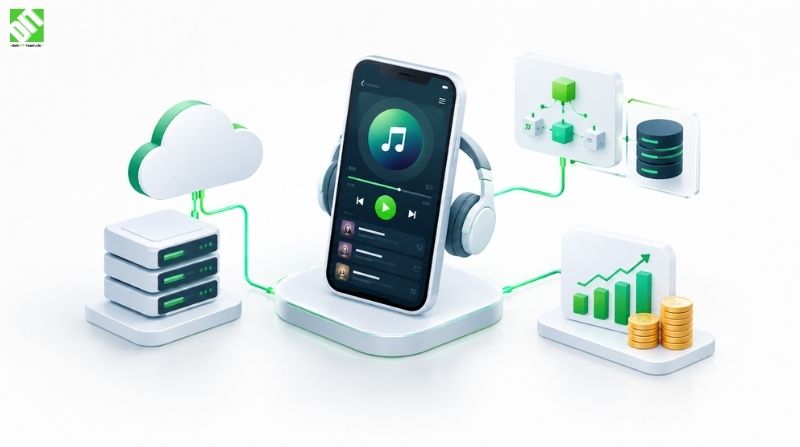
Music streaming app development explained: core features, backend architecture, and MVP vs full-scope budgets, plus how to plan for licensing.
Music streaming app development is the process of building a mobile or web product that lets people search a catalog of audio, play it instantly over the internet, save it into playlists, listen offline, and pay for access through a subscription or ad-supported tier. The quick answer on budget: a focused MVP is a fraction of the cost of a full Spotify-style platform, and the gap comes almost entirely from backend complexity, not from screens.
Most teams underestimate the backend. A player screen with a play button is easy to design. What sits behind it (audio delivery, encoding, rights metadata, entitlement checks, recommendation data) is where the budget and the schedule are decided.
This guide covers the core modules, how the architecture fits together, what separates an MVP from a full-scope build, and what drives music app development cost. It also covers licensing, which we treat here as a planning item rather than a legal topic.
What a Music Streaming App Actually Is
A music streaming app is a client application (iOS, Android, web, or all three) connected to a backend that stores audio files and metadata, delivers audio in small chunks, and decides who is allowed to hear what.
The app itself is the smaller part of the system. A working product has four layers:
Client apps that handle playback, browsing, and downloads
Backend services for users, catalog, playlists, subscriptions, and search
Media pipeline that ingests, encodes, stores, and delivers audio
Admin and analytics tools for content operations, reporting, and moderation
Keeping these four layers separate in your plan is the single best way to avoid scope surprises later.
Who builds these apps
Music is only one use case. The same architecture supports podcast platforms, audiobook apps, meditation and wellness audio, radio apps, and artist-owned fan platforms. If your product is any kind of audio library behind a login, most of what follows applies. Teams working on mobile app development for media products usually start by deciding which platforms matter first, because that choice affects both the audio player implementation and the timeline.
Core Modules Every Music Streaming App Needs
Catalog and Metadata
The catalog is the structured database of tracks, albums, artists, genres, and the relationships between them. It is more than a list of files. Each track needs a title, artist credits, duration, release date, artwork, language, explicit flags, and identifiers that your content partners use on their side.
Get the metadata model right early. Changing how you represent featured artists, compilations, or multiple versions of the same song after launch means migrating every record, and it quietly breaks playlists and search along the way.
Playback Engine
Playback is the feature users judge you on. It needs to start quickly, survive a weak connection, and keep going when the phone locks or another app takes over audio.
Key playback requirements:
Adaptive bitrate streaming, so quality adjusts to network speed
Gapless playback and optional crossfade
Background audio and lock screen controls
Handling of interruptions such as calls and navigation prompts
Queue management, shuffle, and repeat
Output routing for Bluetooth, car systems, and casting
Most teams use established streaming protocols such as HLS or DASH rather than building delivery from scratch. The work is in the integration, the buffering strategy, and testing on real devices and networks.
Search and Discovery
Search needs to forgive typos, understand partial names, and rank results sensibly. A basic version can run on a standard search engine over your metadata. Discovery features such as home feeds, mood playlists, and “similar artists” come later and depend on listening data you do not have on day one.
That is why recommendation engines belong in a later phase for most products. If you later want personalization, the AI development side (recommendation models, listening behavior analysis) becomes a real workstream, but it needs data volume to be useful.
Playlists and Library
Playlists are the main way people build attachment to a service. The core needs are creating, editing, reordering, and deleting playlists, plus a “liked songs” library and recently played history.
The harder parts are sync and conflict handling. If someone edits a playlist offline on their phone and on the web at the same time, your backend needs a clear rule for resolving it. Collaborative and shareable playlists add permissions, deep links, and notification logic on top.
Offline Mode
Offline listening is a common reason people pay for a subscription, and it is more involved than a download button. The app must:
Download encrypted audio files to device storage
Track which downloads belong to which account and which subscription state
Re-check entitlement periodically, so a cancelled subscription cannot keep playing forever
Manage storage limits and let users pick audio quality
Resume interrupted downloads and clean up partial files
Offline mode touches the client, the backend, and your rights setup at once, which is why it is often a “launch” feature in a full-scope build but a “phase two” item in an MVP.
Subscriptions and Payments
Subscriptions define the business model. You will typically choose among free with ads, premium monthly, annual, and family or student tiers.
Practical points to plan for:
App store billing rules. Mobile platforms have their own in-app purchase systems and policies, which affect how and where you can sell subscriptions. Check current platform terms before locking the pricing model.
Entitlements. A single service decides what each account can access (ad-free, offline, high quality) so every client enforces the same rules.
Billing states. Trials, grace periods, failed payments, pauses, and refunds all need defined behavior.
Web checkout. If you also sell on the web, you need a payment provider integration and a way to keep mobile and web subscription states in sync.
User Accounts and Profiles
Registration, login (email, social, or single sign-on), profile settings, parental or explicit-content controls, and account deletion. Do not treat this as boilerplate. Account data in a media app is also your personalization and billing foundation.
Admin Panel
Someone has to upload content, fix metadata, manage featured sections, handle takedowns, and look at reports. A usable admin dashboard is often skipped in early estimates and then built in a hurry after launch. Put it in the scope from the beginning.
Backend Architecture for Music Streaming
The architecture question is how to deliver audio to many people reliably without paying for more infrastructure than you need.
Reference architecture at a glance
| Component | What it does | Notes |
| API layer | Serves the apps with catalog, playlist, user, and subscription data | Needs versioning so old app releases keep working |
| Authentication service | Handles login, tokens, session management | Often token-based with refresh logic |
| Catalog and search service | Stores metadata and powers search | Search is usually a dedicated engine, not the main database |
| Media ingestion and encoding | Accepts uploads, validates files, creates multiple bitrates | Runs asynchronously in a job queue |
| Object storage | Holds the master and encoded audio files | Cheap, durable, and separate from the app database |
| Content delivery network (CDN) | Caches audio close to listeners | The main lever for playback speed and bandwidth cost |
| Entitlement and licensing check | Verifies the user may play or download a track | Called at playback start and at download refresh |
| Subscription and billing service | Tracks plans, payments, and store receipts | Reconciles app store and web payments |
| Recommendation and analytics pipeline | Collects listening events and produces suggestions | Usually phase two or later |
| Notification service | Push messages, email, in-app messages | Used for releases, billing, and re-engagement |
Monolith first or microservices?
For an MVP, a well-structured modular monolith is usually the more sensible starting point. It is faster to build, simpler to deploy, and easier to debug. Microservices make sense when different parts of the system need to scale independently, for example when media processing or search grows much faster than the rest.
The point is to draw clean boundaries between modules from day one so you can split them later without rewriting. Teams that jump straight to many small services often spend the first months managing infrastructure instead of shipping features.
Streaming delivery and the CDN
Audio files are split into short segments and delivered over HTTP. The player requests the next segments while the current one plays, and switches to a lower or higher bitrate depending on the connection. A CDN keeps popular segments near users, which lowers latency and reduces load on your origin storage.
Cloud setup is a major part of this. Decisions about storage tiers, regions, caching rules, autoscaling, and monitoring are where cloud integration expertise directly affects both listener experience and the monthly hosting bill. Streaming costs grow with usage, so cost visibility should be part of the architecture, not an afterthought.
Technology categories to decide
The right stack depends on your team, platforms, budget, and scale targets. The categories to settle are:
Client approach: native iOS and Android, or a cross-platform framework
Backend language and framework
Primary database for users, playlists, and subscriptions
Search engine for catalog queries
Object storage and CDN provider
Media processing tools for encoding
Authentication and payment providers
Analytics and monitoring tools
Audio playback quality is one area where native capabilities matter, so the native versus cross-platform decision deserves a proper technical review rather than a default choice.
Music Licensing: A Planning Item, Not an Afterthought
Licensing decides what content you can legally offer, in which countries, and on which terms. It is not something a development team can resolve for you, and nothing in this article is legal advice. What you can do is plan the product so it can support whatever agreements you reach.
From a build perspective, think about:
Rights metadata. Fields for territories, usage types, start and end dates, and rights holder identifiers.
Territory controls. The ability to restrict or open content by country.
Reporting. Play counts and usage reports are typically needed for royalty reporting, so listening events must be captured accurately and stored reliably.
Takedown handling. A simple way to disable a track or catalog quickly.
Content source model. Whether you license a catalog, work directly with independent artists, or host user or creator uploads. Each model changes the ingestion, moderation, and reporting requirements.
Talk to a qualified media lawyer and your content partners before you finalize the scope. Then let the confirmed requirements shape the data model, rather than retrofitting rights fields into a finished catalog.
MVP vs Full-Scope Music Streaming App
An MVP proves that people want your specific product. A full-scope build is the product you grow into. The mistake is trying to ship the second when you can only afford the first.
| Area | MVP | Full scope |
| Platforms | One mobile platform, or a cross-platform app | iOS, Android, web, and possibly TV or car integrations |
| Catalog | Limited, curated library | Large catalog with rich metadata, multiple versions, and credits |
| Playback | Reliable streaming, basic queue, background play | Gapless, crossfade, casting, multiple quality tiers, car and wearable support |
| Playlists | Create, edit, like | Collaborative playlists, sharing, folders, smart playlists |
| Offline mode | Often excluded or limited | Full encrypted downloads with entitlement refresh |
| Subscriptions | One paid tier, simple trial | Multiple tiers, family plans, promos, regional pricing |
| Discovery | Editorial picks and basic search | Personalized feeds, recommendations, radio modes |
| Admin | Basic content and user management | Full content operations, reporting, rights management |
| Analytics | Core usage events | Deep listening analytics and experimentation |
| Infrastructure | Single region, modest scaling | Multi-region delivery, advanced monitoring, high availability |
A sensible MVP for many teams is: accounts, a curated catalog, solid streaming, search, playlists, one subscription tier, and a basic admin tool. Offline mode and recommendations are good candidates for the second release, once you have real usage data.
If you are still exploring the idea, a clickable prototype designed by a UI/UX team, tested with a few listeners, is cheaper than discovering a navigation problem after development.
Music App Development Cost: What Drives the Budget
There is no honest single price for a music streaming app, and anyone quoting one without seeing your scope is guessing. Costs depend on what you build, how many platforms you target, and who builds it.
For planning purposes, think in tiers rather than exact numbers:
Prototype or proof of concept: the lowest tier, focused on validating the concept with limited functionality.
MVP: typically a mid-range investment, covering the essential modules on one or two platforms.
Full-scope platform: a substantially higher investment, with multi-platform clients, advanced features, and production-grade infrastructure.
Actual figures swing widely with team location, seniority, and scope, so get a written estimate based on a requirements document instead of relying on generic ranges from the internet.
The main cost drivers
| Cost driver | Why it matters |
| Number of platforms | Each native client is effectively a separate build and test effort |
| Offline mode and DRM-style protection | Adds client storage logic, encryption, and entitlement refresh |
| Catalog size and ingestion | Bulk import, metadata cleaning, and encoding pipelines take time |
| Subscription complexity | Multiple tiers, store billing, and promo logic add edge cases |
| Recommendation features | Needs data pipelines and model work, and enough data to be useful |
| UI/UX depth | Custom animations, theming, and accessibility add design and QA time |
| Third-party integrations | Payments, analytics, social login, and rights or royalty tools each need integration work |
| Backend scalability | Designing for high concurrency costs more than designing for a pilot |
| Security and compliance | Secure storage, privacy features, and audit needs add effort |
| Testing | Audio testing across devices, OS versions, and network conditions is time-consuming |
| Ongoing costs | Hosting, CDN bandwidth, licensing fees, and maintenance continue after launch |
Remember that development is only one part of the cost. CDN bandwidth and content licensing are recurring and scale with your audience, so model them alongside the build budget.
How Long Does It Take to Build a Music Streaming App?
A focused MVP commonly takes a few months from discovery to launch, while a full-scope platform with several clients and advanced features takes considerably longer and is usually released in stages. The range depends on scope clarity, team size, and how quickly content agreements and design decisions are made.
A staged release plan works well:
Discovery and scope. Define users, business model, content sources, and success metrics.
Design. Wireframes, prototype, and a clear design system.
Architecture planning. Decide the module boundaries, data model, and cloud setup.
MVP build. Core modules, admin tool, and a basic analytics setup.
Testing and hardening. Device testing, load testing, and security review.
Launch and monitoring. Controlled rollout and close tracking of playback errors and retention.
Iteration. Offline mode, personalization, and extra platforms based on actual behavior.
For a more general walkthrough of these stages, see our guide to the mobile app development process for businesses, which covers the phases that apply to any app project.
Security and Reliability Considerations
Music apps look low-risk, but they handle accounts, payment states, and valuable content.
Account security: Token-based authentication, secure password handling, and protection against credential stuffing.
Content protection: Signed or time-limited URLs for audio delivery, and encrypted downloads for offline files.
Payment safety: Use established payment providers and store billing rather than handling card data yourself.
Privacy: Listening history is personal data. Plan consent, data retention, and deletion in line with the privacy rules of your markets, and have this reviewed by a qualified professional.
Reliability: Monitoring, alerting, and a tested recovery plan. Listeners notice a playback outage within minutes.
Abuse prevention: Rate limiting and basic fraud detection for account sharing or scripted downloads.
Common Mistakes to Avoid
Starting with the player UI and leaving the backend for later. The backend decides cost and scalability.
Planning licensing after the product is built. Rights data shapes the catalog model.
Over-building the MVP. Offline mode, social features, and recommendations can wait until you have users.
Ignoring CDN and bandwidth costs in the business model. Free tiers can get expensive fast.
Underestimating audio QA. Real devices, real networks, and real interruptions expose problems that simulators miss.
Skipping the admin tool. Content operations will otherwise run through database edits.
Conclusion
Music streaming app development is less about building a player and more about building a dependable media platform around it: a clean catalog, a delivery pipeline, an entitlement system, and a subscription model that holds together across devices. The most reliable path is to start with a tight MVP, treat licensing as a planning input from day one, and add offline mode, personalization, and extra platforms in stages once you know what your listeners actually use.
If you are weighing scope, platforms, or budget, a short requirements review usually clears up more than weeks of guesswork. Teams that need a tailored platform rather than an off-the-shelf template often look to custom software development so the architecture matches their content model and business plan. If you want to talk through your idea, you can discuss your project with the DEIN IT TEAM and get a realistic view of scope and phasing.
Frequently Asked Questions
How much does it cost to develop a music streaming app?
It depends on scope, platforms, and team. A focused MVP costs far less than a full platform with offline mode, personalization, and multi-platform clients. Reliable figures require a requirements document, and recurring costs such as hosting, CDN bandwidth, and content licensing come on top of the build.
How long does it take to build a music streaming app?
A focused MVP commonly takes a few months, and a full-scope product takes longer and is usually released in stages. Clear requirements and early decisions on content sources and design shorten the timeline.
What features should a music streaming app include?
At minimum: user accounts, a searchable catalog, reliable audio playback with background support, playlists and a library, and a subscription or ad model. Offline mode, recommendations, and social features typically follow in later releases.
How does a music streaming app work technically?
Audio files are encoded into several bitrates, stored in cloud storage, and delivered in short segments through a CDN. The app requests segments as you listen and adjusts quality to your connection, while the backend checks whether your account is allowed to play the track.
Which technology is best for a music streaming app?
There is no single best option. The choice depends on your platforms, team skills, scale goals, and budget. Native clients suit products that need the most control over audio behavior, while cross-platform frameworks can reduce cost for simpler players.
Do I need music licenses before I build the app?
You need them before you offer licensed content to the public, so plan for them early. Licensing affects your data model, territory controls, and reporting. Speak with a qualified legal professional and your content partners to confirm what you need for your model.
Can I build a music streaming app with an MVP first?
Yes, and it is usually the better approach. An MVP with accounts, a curated catalog, streaming, playlists, and one subscription tier lets you test demand before investing in offline mode, personalization, and additional platforms.
How does offline mode work in a music app?
The app downloads encrypted audio files to the device and stores them with the account and subscription details. It periodically re-checks entitlement with the server, so downloads stop working if the subscription lapses.
Is it better to build a custom app or use a white-label music platform?
White-label platforms launch faster and cost less upfront but limit design, features, and data ownership. A custom build costs more initially and suits products with a distinct content model, brand experience, or long-term growth plans.
How do music streaming apps make money?
Common models are paid subscriptions, ad-supported free tiers, and a mix of both. Some platforms add artist services, merchandise, or premium audio tiers. Your model should be set early because it affects the subscription logic and the entitlement system.
Recent Posts
October 13, 2026
October 13, 2026