

Azure Cloud Migration Strategy: A Step-by-Step Guide for Businesses
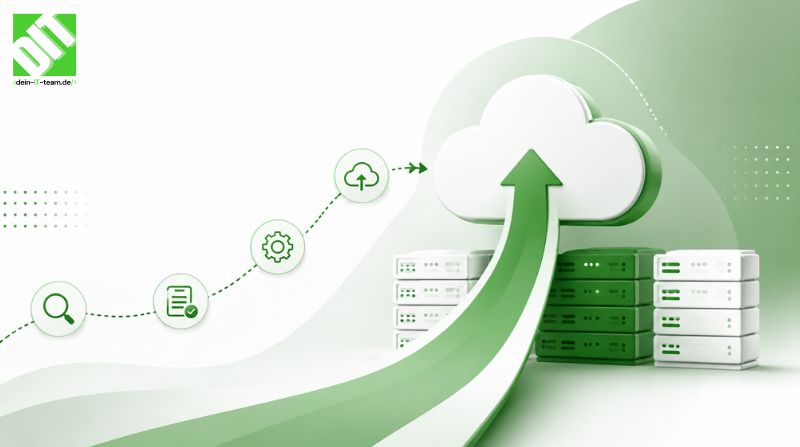
Learn a practical Azure cloud migration strategy with steps for assessment, migration, security, governance, and cloud optimization.
Migrating enterprise IT infrastructure from on-premise data centers or legacy servers to Microsoft Azure represents a defining turning point in modern digital transformation. For corporate decision-makers, CTOs, and engineering leaders, transferring complex application workloads, databases, and network architectures into the cloud is far more than a simple data transfer exercise. A poorly executed transition leads to spiraling cloud operational costs, security vulnerabilities, and catastrophic service downtime that halts critical business operations.
To realize the full financial and operational benefits of Microsoft Azure—such as dynamic elastic scaling, enterprise-grade data security, and seamless global availability—organizations require a structured, risk-mitigated execution roadmap. A comprehensive cloud strategy aligns business outcomes with technical execution, ensuring every server, microservice, and database is evaluated, migrated, and optimized systematically.
Key Takeaways
Phased Strategy Mitigates Risk: Structured assessment, discovery, and wave-based migration execution eliminate unexpected enterprise downtime and operational disruption.
The 5 R's Migration Framework: Choosing the correct treatment pattern—Rehost, Replatform, Refactor, Rearchitect, or Replace—ensures optimal balancing of initial deployment speed with long-term cloud performance.
Financial and Operational Optimization: Early FinOps adoption and Azure Landing Zone governance prevent unexpected cloud billing spikes while establishing strict data security boundaries.
Continuous Post-Cutover Governance: Real-time monitoring via Azure Monitor and Automated Policy Enforcement guarantees ongoing system health, compliance, and performance reliability.
The Strategic Foundation: Evaluating the 5 R's of Cloud Migration
Before moving a single byte of enterprise data into Microsoft Azure, software architects must categorize every application within the organizational portfolio. Microsoft's Cloud Adoption Framework highlights five core migration strategies, often referred to as the 5 R's. Selecting the appropriate strategy for each workload determines whether your transition achieves high efficiency or creates ongoing technical debt.
Rehosting (Lift and Shift)
Rehosting involves moving virtual machines, physical servers, and databases directly to Azure infrastructure without modifying the underlying application architecture code. This approach serves as the fastest path to cloud adoption, making it ideal for legacy systems with tight migration deadlines or impending hardware lease expirations. While rehosting minimizes initial engineering costs, it carries forward existing legacy inefficiencies into the cloud environment.
Replatforming (Lift, Tinker, and Shift)
Replatforming introduces targeted, low-risk optimizations to application components without altering core business logic. A typical enterprise example involves transitioning a self-hosted database on a virtual machine to Azure SQL Database or moving a web application to Azure App Service. Replatforming reduces operational management overhead by leveraging managed Platform-as-a-Service infrastructure while maintaining minimal development friction.
Refactoring and Rearchitecting
Refactoring and rearchitecting involve modifying application code and structural design to make workloads cloud-native. Engineering teams decouple monolithic software platforms into scalable microservices, containerize applications using Azure Kubernetes Service, or deploy serverless workflows through Azure Functions. This strategy unlocks maximum cloud flexibility, auto-scaling capabilities, and long-term cost optimization, though it requires significant upfront engineering investment.
Replacing and Retaining
Replacing involves decommissioning custom legacy applications in favor of turnkey Software-as-a-Service solutions, such as adopting Microsoft 365 or Dynamics 365. Conversely, retaining involves keeping specific data workloads on-premise due to strict regulatory compliance, data residency constraints, or ongoing hardware depreciation cycles, often integrated with the cloud using hybrid management frameworks like Azure Arc.
Step 1: Automated Discovery, Dependency Mapping, and Readiness Assessment
The initial phase of an enterprise Azure cloud migration focuses on total environment visibility. Attempting to migrate application servers without mapping dependent database connections or third-party API integrations is a primary cause of post-cutover failure.
Engineering teams begin by deploying automated discovery tools such as Azure Migrate across physical and virtual environments. These tools catalog all running workloads, inventory software assets, and capture real-time performance metrics including CPU utilization, memory consumption, storage input/output operations per second, and network bandwidth usage.
Simultaneously, dependency mapping identifies intricate inter-service relationships across the entire IT estate. Understanding how front-end portals communicate with backend enterprise resource planning databases or authentication services prevents orphaned dependencies during cutover. The assessment yields a complete cloud readiness score, highlighting potential configuration blockers, operating system incompatibilities, and precise right-sizing compute recommendations for Azure virtual machine SKUs.
Step 2: Financial Planning, Total Cost of Ownership, and FinOps Architecture
A successful cloud strategy must establish financial predictability early in the planning process. Transitioning from a capital expenditure model based on physical hardware investments to an operational expenditure model based on consumption requires strict financial governance.
Organizations calculate their Total Cost of Ownership by comparing baseline on-premise costs—including server hardware maintenance, facility power, cooling, data center real estate, and virtualization licensing—against projected Azure consumption costs. Leveraging tools such as the Azure TCO Calculator and Pricing Calculator allows financial decision-makers to project monthly run rates accurately.
To maximize cost savings, cloud architects integrate financial optimization mechanisms prior to migration. Utilizing Azure Reserved Instances or Savings Plans for predictable, baseline compute workloads yields significant cost reductions compared to standard pay-as-you-go pricing. Furthermore, implementing hybrid licensing benefits allows existing Windows Server and SQL Server licenses to transfer directly to Azure, reducing operational costs. Establishing tag-based budget tracking and automated cost alert thresholds ensures continuous accountability across departments.
Step 3: Landing Zone Preparation and Azure Governance Baseline
Building a secure, scalable foundation—known as an Azure Landing Zone—ensures that newly migrated workloads operate within a well-governed, compliant corporate environment. A landing zone provides pre-configured subscription structures, identity management, network topology, and security controls.
Identity and access management is established through Microsoft Entra ID, enforcing role-based access control and multi-factor authentication across all operational subscriptions. Network architecture is configured using a hub-and-spoke topology, isolating production environments from staging and development while centralizing core network security services, web application firewalls, and VPN gateways.
Governance policies are codified using Azure Policy and Blueprints to enforce compliance baselines automatically. For instance, policies restrict resource deployments to specific geographic Azure regions to adhere to data sovereignty regulations like GDPR, mandate storage encryption at rest, and block public access to storage accounts. Preparing the enterprise landing zone guarantees that migrated assets immediately inherit the enterprise security posture.
Step 4: Migration Wave Execution, Data Replication, and Cutover Testing
With the foundation secured, the execution phase begins through wave planning. Workloads are categorized into phased migration waves based on business priority, technical complexity, and dependency risk. Non-critical non-production environments are migrated first to validate deployment pipelines, followed by lower-tier business tools, and finally mission-critical enterprise systems.
Data migration relies on specialized replication tools. Database workloads transition using Azure Database Migration Service, ensuring continuous data replication with minimal downtime. Large-scale unstructured storage and virtual disks undergo asynchronous background replication using Azure Migrate agents or agentless appliances.
Prior to final domain cutover, rigorous validation testing takes place in staging environments. Performance benchmarking ensures that compute resources meet operational requirements, while security penetration tests verify access controls. During the scheduled cutover window, production traffic is gracefully redirected through DNS updates or Traffic Manager routing, bringing the Azure environment live while maintaining instant rollback capabilities if anomalies arise.
During complex digital transformations, modernizing legacy enterprise systems often requires deeper system connectivity and data synchronization. Organizations exploring multi-cloud setups or hybrid environments should evaluate why cto ensure unified data flow across all operational platforms.
Step 5: Post-Migration Optimization, Continuous Governance, and Monitoring
The cloud journey does not end when cutover finishes. The final step centers on continuous operational refinement, system performance tuning, and proactive cloud management.
Comprehensive operational monitoring is configured using Azure Monitor, Application Insights, and Log Analytics. These tools aggregate diagnostic metrics and telemetry across compute nodes, databases, and network backbones, alerting engineering teams to potential bottleneck points before end-users experience degradation. Security postures are actively monitored through Microsoft Defender for Cloud, providing automated threat detection and compliance recommendations.
From a software design standpoint, post-migration refinement often transitions rehosted workloads toward cloud-native services over time. Decoupling legacy database monoliths or updating back-end code paths enables higher application availability and lower maintenance overhead. Businesses seeking to accelerate software modernization and build resilient, cloud-tailored web or enterprise platforms can partner with specialized external engineering partners through custom software development to transform raw cloud infrastructure into high-performing business engines.
Building a Resilient Future with Azure Cloud Engineering
Executing an enterprise Azure cloud migration requires a balance between technical expertise, architectural discipline, and business alignment. By following a structured step-by-step strategy—spanning automated discovery, financial modeling, landing zone governance, wave execution, and post-migration optimization—organizations eliminate migration risks, prevent unexpected cost overruns, and unlock scalable performance.
Partnering with experienced cloud engineering specialists ensures that your cloud infrastructure is built correctly from day one, laying a resilient digital foundation engineered for long-term growth and technical innovation.
Conclusion
Executing a successful Azure cloud migration is far more than an IT project—it is a foundational business decision that dictates an enterprise's ability to innovate, scale, and maintain data security. By following a structured strategy that begins with automated dependency mapping, establishes rigorous FinOps controls, and leverages robust landing zones, organizations eliminate the traditional risks of cloud adoption.
Navigating this transition without operational downtime requires experienced cloud engineers who understand both high-level system architecture and low-level execution. Partnering with dedicated cloud engineering experts ensures your infrastructure is optimized for long-term performance, cost efficiency, and security from day one.
Frequently Asked Questions (FAQ)
What is an Azure cloud migration strategy?
An Azure cloud migration strategy is a structured framework that outlines how an organization moves its applications, databases, and IT infrastructure from on-premise setups or legacy systems to Microsoft Azure. This process includes initial system discovery, financial planning, cloud architecture design, phased wave migration, and continuous post-cutover performance optimization.
How do businesses prevent operational downtime during an Azure migration?
Downtime is minimized by deploying automated, real-time replication tools such as Azure Database Migration Service and Azure Migrate. By staging workloads directly within cloud environments and thoroughly testing system dependencies prior to the final cutover window, DNS traffic can be redirected smoothly with zero to minimal disruption to business operations.
How can companies manage and control costs during and after moving to Azure?
To avoid unexpected billing spikes, organizations should establish a FinOps model early in the migration planning process. Cost efficiency is achieved by right-sizing virtual machines based on actual performance telemetry rather than legacy hardware specifications, utilizing Azure Reserved Instances or Savings Plans for predictable workloads, leveraging Azure Hybrid Benefit to reuse existing Windows and SQL Server licenses, and setting automated budget alerts and governance policies through Azure Cost Management.
Recent Posts
October 13, 2026
October 16, 2026
October 13, 2026