CRM Data Migration: Steps, Costs, Challenges, and Best Practices
Learn how to migrate CRM data. Understand costs, challenges, and best practices for moving customer data without disruption.
Moving your customer relationship management system to a new platform is one of the most critical decisions a business can make. Every customer interaction, sales opportunity, and support history depends on the accuracy and accessibility of that data. Get the migration wrong, and you're looking at lost leads, duplicated records, broken workflows, and frustrated teams. Get it right, and you unlock faster insights, better customer experiences, and stronger operational efficiency.
CRM data migration is far more than a technical task. It involves careful planning, clear communication across departments, and meticulous attention to data quality. This guide walks you through what successful CRM data migration looks like, what actually drives the costs, where problems typically emerge, and how to navigate the entire process without disrupting your business.
What Is CRM Data Migration?
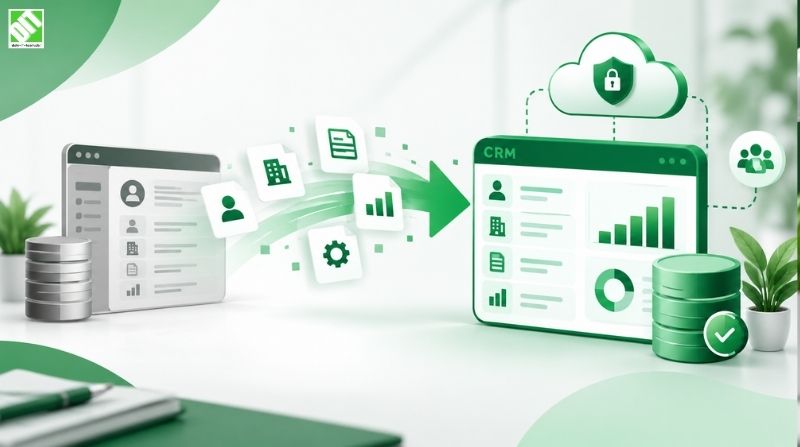
CRM data migration is the process of moving customer data, contact records, transaction history, communication logs, and all associated business information from one CRM system to another. This might mean moving from an outdated on-premises CRM to a cloud-based platform, upgrading to a more capable system, consolidating multiple CRM instances into one unified platform, or transitioning to a completely different vendor.
The scope sounds straightforward until you start digging into the reality. A typical CRM contains millions of data points spread across hundreds of fields, with inconsistent formatting, duplicate entries, missing information, and relationships between records that must remain intact. Customer records connect to sales opportunities, activities, invoices, cases, and communication histories. Break those connections during migration, and your new system becomes unreliable almost immediately.
Why CRM Data Migration Matters for Your Business
Your CRM is often your most valuable business asset. It holds the complete history of every customer relationship, every sales pipeline stage, and every support interaction. When you move to a new system, you're making a bet on improved capability, better performance, or lower operational costs. That bet only pays off if your data arrives intact and your teams can trust the information they're working with from day one.
Companies that approach CRM migration casually often face consequences: lost sales opportunities, customer service delays, duplicate accounts, inaccurate reporting, and widespread team frustration that can last months. In contrast, organizations that invest in thoughtful data migration planning typically see faster adoption, cleaner data, better analytics, and a smoother transition than they anticipated.
The investment in getting migration right almost always pays for itself through improved data quality alone. Most organizations discover during migration that their existing CRM contains significant data quality issues: duplicates, missing fields, outdated information. Migration forces you to confront these problems and fix them before they follow you to the new system.
Key Challenges in CRM Data Migration
Understanding where migrations typically fail helps you avoid those pitfalls.
Data Quality Issues
Nearly every organization underestimates the state of their existing data. Fields are inconsistent, formatting varies, records contain duplicates, important information is missing or scattered across comments fields, and naming conventions are all over the place. You might have three different records for the same customer because the name was entered differently each time. Contact information might span multiple fields in your current system but consolidate into single fields in the new platform. Phone numbers might be formatted as (555) 123-4567 in some records and 555.123.4567 in others.
The challenge intensifies when you multiply this across hundreds of thousands of records. Cleaning data manually isn't feasible. Automated cleaning requires mapping rules that catch most problems but often miss edge cases.
Field Mapping Complexity
Your current CRM and target CRM likely don't organize data the same way. What exists as one field in your old system might split into multiple fields in the new one. Custom fields in your legacy system might not exist in the new platform at all. Certain business logic that was embedded in your old system might need to be recreated through different mechanisms in the new one.
Field mapping sounds simple until you're working through the twentieth special case where the source data doesn't align neatly with the target structure.
Maintaining Data Relationships
CRM data is relational. Opportunities connect to accounts, which connect to contacts. Cases connect to products. Activities connect to multiple entities. These relationships must survive migration intact. If a link breaks, you lose crucial context. An opportunity might become orphaned from its account, or a communication history might disconnect from the contact it belongs to.
The larger and more complex your data model, the more relationships you need to track and validate.
Downtime and Business Continuity
You can't simply shut down your CRM for a week while data migrates. Sales teams still need to close deals. Support teams still need to handle customer issues. You need a strategy that either minimizes downtime to a few hours or implements migration in phases that don't disrupt ongoing business.
User Adoption After Migration
Technical migration success doesn't guarantee user adoption. If your team doesn't trust the data in the new system, they'll find workarounds. They'll maintain spreadsheets alongside the CRM. They'll create duplicate records because they're not sure if information migrated correctly. Poor adoption after migration often means you don't realize the benefits you expected from the new system.
Steps in a Successful CRM Data Migration Process
Breaking migration into phases reduces risk significantly. Here's how mature organizations approach it.
1. Discovery and Assessment
Before touching any data, you need to understand what you actually have. Meet with key departments to identify what data matters most to their work. Map out critical fields, custom configurations, integrations, and business processes that depend on your CRM.
Audit your existing data. Run reports on record quality, identify duplicates, flag missing critical information, and understand data volume. This discovery phase typically reveals that a quarter or more of your records need cleanup before migration.
Define what success looks like. What's your tolerance for data loss? How quickly do you need to complete migration? What's acceptable downtime? These decisions shape everything that follows.
2. Data Cleansing
This phase addresses the data quality issues you identified in discovery. Deduplicate records, standardize formatting, consolidate scattered information, and fill critical gaps where possible.
Some cleanup happens automatically through matching algorithms. Duplicates with identical names and phone numbers might be merged by a tool. Formatting inconsistencies can be fixed through scripted transformations. But the majority of cleanup requires human judgment. A person needs to decide whether "Bob Smith" and "Robert Smith" are the same account or different people.
Budget significant time for this phase. Many migrations get delayed here because the volume of manual cleanup exceeds initial expectations.
3. Field Mapping and Data Model Design
Create a detailed map of how source fields translate to target fields. Document which legacy fields will be retained, which can be ignored, and how complex transformations will happen. This is where you decide what custom fields your new system needs, how your data hierarchy will be restructured, and what business logic needs to be configured differently.
This step often requires collaboration between IT and department heads. A field might seem unimportant from a technical perspective but crucial from a business perspective.
4. Building Migration Code and Testing
Technical teams write code or configure migration tools that transform source data and load it into the new system. This code gets tested repeatedly against subsets of your data to identify issues before the full migration attempt.
Testing should include validation checks. After each test migration, teams verify that record counts match expectations, relationships survived intact, data wasn't corrupted, and critical calculations (like opportunity value) still work correctly.
Most organizations do at least two full test migrations before attempting the production run.
5. Pilot Migration with Real Users
Run a full migration for a single department or region. Let actual users work with the migrated data in the new system for a week or two. This reveals issues that testing might miss because it exposes how real users actually work with the data, not how you theoretically think they will.
Pilot users become migration champions who can answer questions from their colleagues when full deployment happens.
6. Final Preparation and Communication
Brief all users on what's happening, when it's happening, and what they need to do. Provide training on how the new system works, even if the interface is similar. Set clear expectations about data that might look different, processes that might work differently, and support available during the transition.
Prepare your IT support team. They'll field questions and issues immediately after migration.
7. Production Migration and Validation
Execute the full migration. This usually happens during off-hours to minimize disruption. Immediately after data loads, run automated validation to verify record counts, check for missing critical data, validate relationships, and spot obvious corruption.
Have a small team standing by to investigate any issues immediately.
8. Post-Migration Support
Even when migration goes smoothly, users will find unexpected issues. One team's workflow that depended on a specific field configuration might not work the way they expect. A report that they relied on might need to be rebuilt. Support should be available to address these within hours, not days.
Plan post-migration support for at least two to four weeks after the cutover.
Understanding CRM Migration Costs
CRM data migration costs vary dramatically based on data complexity, system architecture, and how much cleanup your existing data requires.
Major Cost Drivers
Data Volume and Complexity: Migrating 50,000 records with simple structure is fundamentally different from migrating 2 million records with hundreds of custom fields and complex relationships. Each order of magnitude increase in data complexity drives costs up non-linearly.
Data Quality State: If your existing CRM is well-maintained with clean, consistent data, migration costs less than if you're dealing with a legacy system that accumulated years of duplicate and inconsistent records. Budget extra if you're consolidating multiple CRM instances into one platform.
Custom Field Configuration: Legacy systems often have significant custom fields built to accommodate workflow over years. Some translate directly to the new system. Others need to be recreated through different mechanisms or retired because the new system handles that workflow differently.
Integration Requirements: Every system your CRM connects to (accounting software, email systems, marketing automation, data warehouses, etc.) needs to be reconfigured and tested after migration. System integration accounts for meaningful portions of overall project cost.
System Architecture Differences: Migrating between cloud platforms often costs less than migrating from on-premises to cloud because the infrastructure transition is simpler. Conversely, if you're moving from a simple on-premises system to a complex enterprise platform, you're not just migrating data; you're also implementing entirely new capabilities.
Timeline Pressure: Migration compressed into days rather than weeks costs significantly more because it requires more parallel effort and demands expertise standing by constantly. Well-planned migrations with reasonable timelines are far more cost-effective.
Typical Cost Ranges
These figures serve as reference points. Actual costs depend heavily on your specific situation.
Small businesses (under 50,000 records, simple configuration): $15,000 to $40,000
Mid-market organizations (50,000 to 500,000 records, moderate custom configuration): $40,000 to $150,000
Enterprise organizations (500,000+ records, complex integrations, multiple instances): $150,000 to $500,000+
These costs include discovery, data cleansing, migration execution, testing, and post-migration support. They assume working with experienced migration professionals rather than attempting it entirely in-house without CRM migration expertise.
Best Practices for CRM Data Migration
Several principles consistently appear in successful migrations.
Prioritize Data Quality Over Speed
Resist the urge to rush migration. Time invested in data cleansing before migration saves far more time and money than trying to fix problems after go-live. Data quality problems discovered post-migration are exponentially more expensive to fix because they're embedded in the new system and likely touched by user activity.
Map Business Processes, Not Just Data Fields
Don't approach migration as a technical data mapping exercise. Map the actual business processes that depend on your CRM. How do sales teams move opportunities through your pipeline? How does support manage cases? What custom reports do finance teams need? Ensure the new system supports these processes before migration, not after.
Involve Department Heads Early
Migration success depends on user adoption. Users adopt systems they understand and trust. Involve actual users from each department in planning and pilot testing. Their perspective catches issues that IT might miss.
Test Ruthlessly
Testing is the only way to catch data corruption, relationship breaks, calculation errors, and integration failures before they affect your business. Run multiple full test migrations. Automate validation checks. Have users manually spot-check data in pilot phases.
Plan for the Cutover Window Carefully
The moment you flip from the old system to the new one is high-risk. Plan this window during your lowest-activity period. Have a clear rollback plan if something goes wrong. Brief all users on timing and expectations. Ensure support resources are available immediately after cutover.
Don't Migrate Unnecessary Data
Use migration as an opportunity to retire old data you don't need. If you have contacts no longer in your pipeline from five years ago and you don't need them for compliance or historical analysis, leave them behind. Cleaner data sets are easier to migrate and easier to manage going forward.
Establish Clear Success Metrics
Define what success looks like before starting. You might measure it as: all records migrated, data integrity validated, zero critical errors found post-migration, user adoption exceeding 80% within two weeks, or system performance meeting SLAs. Clear metrics help you know whether the migration actually worked.
Technology Considerations for CRM Migration
Several technology decisions significantly impact migration complexity and cost.
Migration Tools and Platforms
Leading CRM platforms provide native data import tools or have well-established third-party tools available. Salesforce has Data Loader, Connector, and various partner tools. Microsoft Dynamics 365 offers specific import capabilities. These tools handle standard formats well but often require custom coding for complex transformations.
For complex migrations, many organizations use middleware integration platforms or work with systems that specialize in CRM data migration. These tools offer mapping capabilities, automated matching and deduplication, relationship preservation, and validation frameworks built specifically for CRM data.
API-Driven Migration
Many modern CRM systems support API-based migration, which allows direct data transfer from legacy systems to new platforms through programmatic means. This approach works well for large-scale migrations and enables incremental, phased approaches where data moves in batches over time rather than all at once.
Validation Frameworks
Robust validation is critical. After data loads, automated checks should verify record counts, validate referential integrity (that relationships are intact), check for required fields, validate against business rules, and spot obvious data corruption. These checks typically run within hours of migration completion.
Common Mistakes to Avoid
Learning from what goes wrong elsewhere saves significant time and money.
Underestimating Data Cleansing
Organizations consistently underestimate the time and effort required to clean existing data. They discover during migration that their data is far messier than expected. Build in extra contingency time for this phase.
Insufficient Testing
Testing that only verifies technical success (data loaded, no errors) but doesn't verify business success (data is accurate and usable) leads to problems discovered only after users are actively working in the new system.
Lack of Rollback Plan
If something goes seriously wrong during cutover, you need a clear rollback plan. This might mean having the old system remain available for a period or having clean backups to restore if necessary. Don't discover mid-crisis that you don't know how to get back to a working state.
Poor Communication with Users
Users who don't understand what's happening or why things look different in the new system will lose confidence quickly. They'll create workarounds. They'll maintain parallel systems. Clear, repeated communication about what's changing and why prevents much of this resistance.
Attempting Too Much Change at Once
Avoid combining CRM migration with major business process changes, significant new configuration, or other large initiatives. Each adds complexity and risk. Migrate to the new system first. Then, after users are comfortable and data is stable, consider process improvements and new capabilities.
Not Planning Post-Migration Support
Migration doesn't end on go-live day. Users will encounter unexpected issues. Reports might need adjustment. Integrations might need tweaking. Support availability in the weeks after cutover is critical for successful adoption.
When to Consider Professional Help
CRM data migration is a specialized discipline. While some organizations have the internal expertise to handle it, many benefit significantly from experienced migration partners.
Consider professional support if your migration involves more than 500,000 records, complex custom field configurations, multiple legacy systems being consolidated, integrations to numerous external systems, or aggressive timelines that don't allow for extended test-and-fix cycles.
An experienced CRM development partner brings several advantages: they've handled similar migrations and know common pitfalls before you encounter them, they have established API development and integration expertise for connecting your new CRM to existing business systems, and they can accelerate the process significantly compared to building expertise in-house.
The investment in professional migration support is often recovered quickly through faster implementation, cleaner data, smoother adoption, and reduced post-migration troubleshooting.
Technology Stack Considerations for Migration
The specific technology stack used in your CRM migration depends on your current system, target system, data complexity, and business requirements.
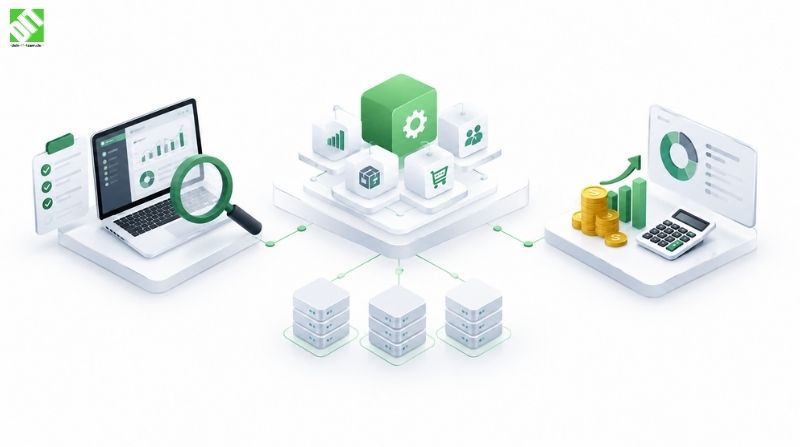
A typical migration architecture includes:
Source System: Your existing CRM containing the data to be migrated
Data Staging Environment: Intermediate storage where data is extracted, transformed, and validated before loading
Transformation Engine: Code or middleware that cleanses data, applies business logic, and maps source fields to target fields
Validation Layer: Automated checks that verify data integrity, completeness, and correctness
Target System: Your new CRM where validated data loads
Integration Layer: Connections from the new CRM to accounting systems, marketing platforms, analytics, and other business applications
Rollback Infrastructure: Backup and recovery capabilities
Final technology decisions depend on project scope, timeline, and the specific platforms involved.
The Business Impact of Successful CRM Migration
Organizations that complete CRM migration successfully typically realize benefits within months: improved data quality that supports better decision-making, faster sales cycles because teams trust data and reports, better customer insights from cleaner consolidated records, improved customer retention through better-informed support and sales teams, and reduced operational costs through more efficient processes.
The investment in thoughtful, well-executed migration is almost always recouped through these benefits. The cost of botched migration, by contrast, can impact your business for years through poor data quality and lost user confidence.
Why Approach CRM Migration Strategically
Your customer data is irreplaceable. The decisions you make during CRM migration shape how effectively you can work with that data for years to come. Strategic approach means investing time in planning, accepting that data cleansing takes effort, testing rigorously, and supporting users through the transition.
When you're considering a migration, it's worthwhile having a partner who understands both the technical execution and the business implications. Connecting with specialists who've handled similar projects helps you avoid costly mistakes and accelerate to success.
If you're in the planning stages of CRM migration, whether moving to a cloud platform, consolidating multiple systems, or transitioning to a new vendor entirely, discussing your specific situation with experienced custom software development professionals can provide clarity on scope, timeline, and what's involved in your particular migration. Understanding what you're taking on is the first step toward a successful transition.
The related topic of why CRM data synchronization matters for customer experience and growth explores how maintaining data quality after migration supports ongoing business performance.
Frequently Asked Questions
How long does a typical CRM data migration take?
Timeline depends heavily on data complexity and organizational readiness. Simple migrations with clean data might complete in six to eight weeks. Complex enterprise migrations with multiple legacy systems, significant data quality issues, and extensive integrations often take four to six months. This includes discovery, planning, cleansing, testing, pilot phases, and post-migration support.
What's the biggest risk in CRM data migration?
Data corruption or loss during the migration process ranks highest, but realistically, most migrations don't lose data. The more common risks are inaccurate field mapping that causes data to load into wrong fields, broken relationships between related records, failure to migrate critical custom fields or functionality, inadequate post-migration support causing users to lose confidence in the new system, and incomplete integration with connected business systems. Addressing these requires thorough testing and clear planning.
Can I migrate without any downtime?
Truly zero downtime is difficult because you need a moment when you stop using the old system and start using the new one. However, you can minimize downtime significantly through phased migration (moving different departments at different times), parallel running (operating both systems for a period), or migrating during lowest-activity periods. Many organizations achieve cutover downtime of just a few hours, which most businesses can accommodate.
How do I handle duplicate customer records during migration?
Deduplication happens before or during migration. Before migration, you can manually identify and merge obvious duplicates in your legacy system. During migration, you can configure matching rules to identify likely duplicates and merge them automatically. Post-migration, you might find duplicates you missed, which requires ongoing cleanup. Complete deduplication is nearly impossible because customers might legitimately have multiple records for different purposes.
What should I do if the migration fails and I need to roll back?
Rollback depends on whether your old system is still running and what backups you have. If you're running both systems in parallel, rollback is simple: you just continue using the old system. If you've decommissioned the old system, rollback means restoring from backups. This is why having clear rollback procedures before migration begins is essential. Some organizations keep the old system available for 30 days post-migration specifically to enable rollback if necessary.
Should I clean data before migration or after?
Clean before migration when possible. Migrating dirty data then cleaning afterward is far more expensive because cleaning in the new system might require rebuilding reports, re-training integrations, and re-validating business logic. Clean data before migration so the new system starts with trustworthy information.
How do I know if my migration was successful?
Successful migration means all expected records transferred to the new system with no data corruption, all fields mapped correctly and contain expected data, relationships between records remain intact, integrations to connected systems function properly, users can work effectively without encountering unexpected missing data, reports produce expected results, and system performance meets requirements. You verify this through automated validation after cutover and user spot-checking during pilot phases.
Can I migrate to a cloud CRM if my legacy system is on-premises?
Yes, and this is increasingly common. On-premises to cloud migration requires planning how to extract data from the legacy system, handle the infrastructure transition, configure the cloud system to match your processes, and establish connections between the cloud system and any on-premises systems that need to remain. The process is similar to any other CRM migration, with added consideration for network connectivity and security during the transition.
Should I migrate all historical data or just recent records?
This depends on regulatory requirements, business needs, and compliance obligations. Archived data from years ago might not be necessary for day-to-day operations but might be required for compliance or audit purposes. Migrate historical data you genuinely need but exclude archived data you don't need. This reduces migration complexity, improves system performance, and saves storage costs.
What happens to my old CRM system after migration?
Many organizations keep the legacy system available in read-only mode for 30 to 90 days post-migration to serve as reference or backup. After that period, if migration was successful and users are working effectively in the new system, the legacy system can be decommissioned. Ongoing support costs, licensing, and storage might justify keeping it for longer if compliance requirements demand data retention.
Recent Posts

October 23, 2026