BEST DEVOPS TOOLS IN 2026 FOR CI/CD, AUTOMATION, MONITORING, AND SECURITY
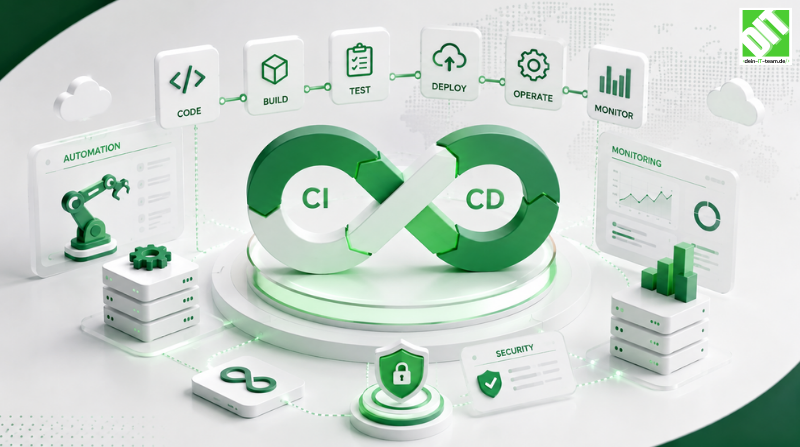
Discover best DevOps tools in 2026. Compare Jenkins, GitLab CI, Kubernetes, Prometheus, Datadog and more for automation, monitoring.
Best DevOps tools have become essential infrastructure enabling organizations delivering software continuously, reliably and securely. Modern software development demands rapid iteration, constant monitoring and automated quality assurance. Traditional manual deployment processes cannot meet competitive market demands. Best DevOps tools automate entire software delivery pipelines from code commit through production deployment, enabling organizations releasing software multiple times daily with confidence. DevOps tools reduce manual effort, eliminate human error and provide visibility enabling teams responding rapidly to issues.
The DevOps tooling landscape is complex and expanding constantly. Hundreds of specialized tools address specific needs—continuous integration, deployment automation, infrastructure management, monitoring, logging, security scanning. Organizations must navigate this landscape selecting best DevOps tools matching their technology stacks, organizational structures and business requirements. Choosing wrong tools creates inefficiencies, integration nightmares and wasted investment. Choosing optimal tools accelerates delivery, improves quality and enhances team satisfaction.
Best DevOps tools share common characteristics enabling effective software delivery. Automation eliminating manual processes. Integration connecting diverse systems seamlessly. Scalability handling growth. Visibility providing insight into systems and deployments. Security preventing vulnerabilities and unauthorized access. Reliability ensuring consistent performance. However, best DevOps tools vary significantly in capabilities, learning curves, pricing models and suitable use cases. This guide evaluates leading best DevOps tools across key categories. Understanding available options enables selecting optimal solutions for your organization.
This comprehensive guide evaluates best DevOps tools systematically. What defines DevOps and why tools matter. Leading tools dominating each DevOps category. Detailed tool comparisons evaluating key characteristics. Selection criteria determining optimal tools. Implementation best practices maximizing benefits. Common pitfalls avoiding. Real-world success stories. By the end, you'll understand how to evaluate best DevOps tools and select optimal solutions for your organization.
Key Takeaways
Best DevOps tools reduce deployment time by 80-90% and enable organizations releasing software multiple times daily safely.
Leading categories of best DevOps tools include continuous integration, deployment automation, infrastructure management, monitoring and security scanning.
Jenkins, GitLab CI, GitHub Actions and CircleCI dominate continuous integration and deployment automation space with varying strengths.
DevOps services provide expertise implementing and optimizing best DevOps tools for maximum organizational benefit.
Kubernetes revolutionized container orchestration enabling scalable microservices deployment and management at enterprise scale.
Monitoring and observability tools like Prometheus, Datadog and New Relic provide critical visibility into system performance and health.
Infrastructure-as-Code tools like Terraform and Ansible enable reproducible, version-controlled infrastructure management.
Security scanning integrated throughout DevOps pipelines prevents vulnerabilities reaching production protecting applications and data.
Best DevOps tool selection depends on technology stacks, team expertise, organizational culture and specific requirements.
Successful DevOps tool adoption requires proper training, process alignment, governance and continuous optimization.
What Are DevOps Tools?
Understanding DevOps and Tool Importance
DevOps represents cultural and technical philosophy combining software development and operations enabling organizations building, testing and deploying software rapidly and reliably. DevOps practices emphasize automation, collaboration, continuous feedback and continuous improvement. DevOps tools enable implementing DevOps practices automating repetitive tasks, integrating disparate systems and providing visibility enabling informed decisions.
Best DevOps tools automate the entire software delivery pipeline from code commit through production deployment. Developers commit code triggering automated builds, tests and deployments. Automated quality checks prevent defects reaching production. Automated deployments enable releasing features instantly. Automated monitoring detects problems immediately. This end-to-end automation enables software delivery velocity and reliability impossible with manual processes.
DevOps tool categories address different pipeline stages. Continuous Integration tools build and test code automatically. Deployment automation tools orchestrate releasing to various environments. Infrastructure management tools provision and configure infrastructure. Monitoring tools provide system visibility. Logging tools collect and analyze application events. Security tools scan for vulnerabilities. Best DevOps tools integrate seamlessly enabling coordinated automated workflows.
Why Best DevOps Tools Matter
Best DevOps tools directly impact business outcomes. Development velocity increases dramatically with automated testing and deployment. Features reaching customers faster create competitive advantage. Time-to-market for bug fixes and security patches decreases from days to minutes. Agility responding to customer feedback or market changes improves significantly.
Quality improves with best DevOps tools through comprehensive automated testing. Unit tests, integration tests, functional tests and security tests run automatically on every code change. Problems discovered early when fixing costs less. Production incidents decrease 70-80% with proper testing and monitoring. Customer experience improves from higher stability.
Cost reduction flows from automation. Manual deployments requiring specialized expertise become automatic. Operations teams shift from firefighting to preventive maintenance. Infrastructure management becomes code-driven and repeatable. Waste from failed deployments decreases. ROI from best DevOps tools typically justifies investment within months.
Team satisfaction improves significantly with best DevOps tools. Developers enjoy rapid feedback revealing problems instantly. Operations teams gain confidence from automated processes and monitoring. Teams move from managing crises to building systems. This satisfaction enables recruiting and retaining talent in competitive markets.
Best DevOps Tools for Continuous Integration and Deployment
Jenkins
Jenkins remains among the most widely deployed best DevOps tools for continuous integration and deployment. Open-source platform offering flexibility and extensive plugin ecosystem. Jenkins enables building complex, sophisticated automation workflows. Self-hosted providing complete control and customization. Community support providing extensive documentation and resources.
Jenkins strengths include massive plugin ecosystem adding virtually any functionality. Pipeline-as-code enables defining complex workflows in version control. Distributed architecture enabling scaling across multiple agents. Extensive integration options connecting to external systems. Large community providing solutions to common problems.
Jenkins limitations include operational overhead—self-hosted requiring infrastructure management, maintenance and security updates. Steeper learning curve compared to managed services. Pipeline syntax complexity increasing for sophisticated workflows. Plugin maintenance sometimes lags upstream projects.
Best for: Organizations requiring ultimate flexibility and control. Complex automation workflows beyond standard CI/CD. Organizations with existing Jenkins investments. Enterprises with operations expertise managing self-hosted infrastructure.
GitLab CI
GitLab CI integrates tightly with GitLab version control providing streamlined continuous integration and deployment. Native integration eliminating context switching between systems. GitLab CI enables building, testing and deploying directly from repository. Scalable architecture handling thousands of jobs. Cost-effective for teams already using GitLab.
GitLab CI strengths include tight GitLab integration providing seamless workflows. YAML pipeline configuration simple yet powerful. Distributed runners enabling scaling. Cost efficiency for GitLab users. Comprehensive feature set including security scanning and deployment. Community and enterprise support.
GitLab CI limitations include limited value if using different version control systems. YAML syntax learning curve. Smaller ecosystem compared to Jenkins. Customization options less extensive than Jenkins plugins.
Best for: Organizations using GitLab for version control. Teams seeking integrated Git and CI/CD platform. Efficient deployment for cloud-native applications. Organizations prioritizing simplicity over ultimate customization.
GitHub Actions
GitHub Actions integrates with GitHub version control enabling continuous integration directly from repositories. Marketplace provides pre-built actions accelerating workflow development. Matrix builds testing across multiple configurations simultaneously. Generous free tier attracting open-source projects and startups. Seamless GitHub integration for organizations already on platform.
GitHub Actions strengths include native GitHub integration with no context switching. Marketplace enabling quick action discovery and reuse. Matrix builds enabling efficient testing. Cost-effective for many organizations. YAML workflow simplicity. Large and growing community.
GitHub Actions limitations include less mature compared to established solutions. Smaller ecosystem compared to Jenkins. Customization options less extensive than Jenkins. Vendor lock-in with GitHub platform.
Best for: Organizations using GitHub for version control. Startups and small teams seeking cost-effective solutions. Open-source projects. Teams prioritizing simplicity and integration.
CircleCI
CircleCI provides managed continuous integration platform with focus on developer experience and performance. Cloud-hosted eliminating infrastructure overhead. Simple yet powerful YAML configuration. Fast builds enabling rapid feedback. Competitive pricing for various organization sizes.
CircleCI strengths include managed service eliminating operational overhead. Fast builds speeding feedback cycles. Developer-friendly configuration and interface. Efficient caching and parallelization. Good integration options. Responsive support.
CircleCI limitations include less customization flexibility compared to Jenkins. Smaller ecosystem. Less control over infrastructure. Higher costs for large-scale operations.
Best for: Organizations seeking managed CI/CD without operational overhead. Startups and growing companies. Teams valuing developer experience and speed. Organizations with moderate automation needs.
Best DevOps Tools for Infrastructure Management
Terraform
Terraform enables infrastructure-as-code approach defining infrastructure through declarative configuration files. Supports multiple cloud providers—AWS, Azure, Google Cloud, others—enabling multi-cloud strategies. Version control enables tracking infrastructure changes. Planning shows changes before applying. State management tracks infrastructure state enabling detecting drift.
Terraform strengths include multi-cloud support avoiding vendor lock-in. Declarative syntax enabling reading and understanding infrastructure. Mature ecosystem with extensive modules. Strong community and vendor support. Planning capability preventing unexpected changes.
Terraform limitations include learning curve for HCL syntax. State management complexity in large environments. Smaller provider support compared to programming-language approaches. Occasional performance issues with large infrastructures.
Best for: Multi-cloud infrastructure management. Organizations requiring infrastructure-as-code rigor. Large-scale infrastructure requiring version control. Teams valuing declarative approaches.
Ansible
Ansible provides agentless configuration management and automation. Simple YAML syntax enabling fast adoption. Agentless architecture eliminating agent installation and management. Broad platform support—Linux, Windows, network devices, cloud platforms. Push-based architecture simplifying deployment.
Ansible strengths include simple YAML syntax enabling rapid learning. Agentless architecture reducing operational overhead. Flexible for both configuration management and orchestration. Large community and extensive playbook library. Push-based execution providing predictable behavior.
Ansible limitations include performance limitations with large numbers of hosts compared to agents. Less sophisticated state management than other tools. Smaller ecosystem compared to some alternatives. Learning curve for complex playbooks.
Best for: Configuration management and orchestration. Organizations seeking agentless approaches. Multi-platform environments. Teams valuing simplicity over ultimate performance.
Kubernetes
Kubernetes revolutionized container orchestration enabling large-scale containerized application deployment. Open-source platform backed by major cloud providers. Automatic scheduling, scaling and self-healing. Service discovery and load balancing built-in. Storage orchestration supporting various backends. Declarative configuration enabling desired-state management.
Kubernetes strengths include industry-standard for container orchestration. Automatic scaling and self-healing improving reliability. Portability across cloud providers and on-premise environments. Mature ecosystem with extensive tools and integrations. Strong community and vendor support. Declarative approach enabling version control.
Kubernetes limitations include steep learning curve and operational complexity. Significant overhead for small deployments. Requires containerized applications limiting legacy system support. Resource consumption for control plane.
Best for: Large-scale container deployments. Organizations requiring multi-cloud portability. Microservices architectures. Enterprise environments with sophisticated orchestration needs.
Best DevOps Tools for Monitoring and Observability
Prometheus
Prometheus provides open-source monitoring and alerting built for cloud-native environments. Time-series database storing metrics efficiently. Powerful query language enabling sophisticated analysis. Pull-based architecture simplifying deployment. Service discovery automating monitored target discovery. Alerting rules triggering alerts on conditions.
Prometheus strengths include open-source and vendor-neutral. Efficient storage enabling long retention. Powerful query capabilities. Cloud-native design with Kubernetes integration. Strong community. Flexible alerting.
Prometheus limitations include pull-based architecture limitations for some scenarios. Limited data retention by default. Clustering requiring additional tools. Steep learning curve for complex queries.
Best for: Cloud-native and Kubernetes environments. Organizations seeking open-source solutions. Microservices monitoring. Technical teams comfortable with learning curves.
Datadog
Datadog provides comprehensive monitoring and observability platform supporting infrastructure, applications and logs. Cloud-hosted service eliminating infrastructure management. Automatic infrastructure discovery reducing configuration. Seamless integrations with hundreds of technologies. Advanced analytics and alerting capabilities. Beautiful dashboards and visualizations.
Datadog strengths include comprehensive platform combining monitoring, logs, traces and synthetics. Automatic infrastructure discovery. Seamless integrations. Advanced analytics and machine learning. Excellent user experience. Strong support. Scalability handling massive workloads.
Datadog limitations include high cost for large-scale deployments. Vendor lock-in with proprietary platform. Learning curve for advanced features. Data retention costs.
Best for: Enterprise organizations requiring comprehensive observability. Organizations seeking managed solution. Teams valuing ease-of-use and integration. Organizations with budget for premium solutions.
Elastic Stack
Elastic Stack provides comprehensive data search and analytics. Elasticsearch provides scalable search and analytics engine. Kibana provides visualization and exploration. Beats provide lightweight data shippers. Logstash provides data processing and pipeline engine. Can be deployed on-premise or cloud-hosted.
Elastic Stack strengths include powerful search and analytics. Highly scalable handling petabytes of data. Flexible deployment options. Strong community. Comprehensive data pipeline capabilities. Cost-effective for self-hosted deployments.
Elastic Stack limitations include operational complexity for self-hosted. Learning curve for complex configurations. Requires infrastructure management. Performance tuning expertise needed.
Best for: Organizations with massive data volumes. Self-hosted deployment preferences. Cost-conscious organizations. Technical teams with infrastructure expertise.
Best DevOps Tools for Security
Custom software development
Security scanning integrated throughout DevOps pipelines prevents vulnerabilities reaching production. Best DevOps tools include built-in security capabilities. Container image scanning detects vulnerabilities in container dependencies. Infrastructure scanning detects misconfigurations. Application scanning detects code vulnerabilities. Compliance scanning verifies compliance with standards. Secret management prevents credential leakage.
Successful security integration requires proper tool selection and configuration. Development teams need scanning feedback enabling fixing issues. Automated policy enforcement prevents non-compliant deployments. Continuous monitoring detects vulnerabilities in running systems. Professional expertise ensures effective security implementation.
SonarQube
SonarQube provides continuous inspection of code quality detecting vulnerabilities, bugs and code smells. Integrates with CI/CD pipelines enabling analysis on every commit. Quality gates preventing code with serious issues merging. Cloud or self-hosted deployment options. Support for numerous programming languages.
SonarQube strengths include comprehensive code quality analysis. Quality gates preventing poor quality code. Excellent reporting and dashboards. Multiple deployment options. Large community.
SonarQube limitations include learning curve for configuration. Performance requirements for large codebases. Database management complexity.
Best for: Organizations seeking code quality enforcement. Teams valuing comprehensive analysis. Organizations with multiple programming languages.
Snyk
Snyk identifies and fixes vulnerabilities in open-source dependencies and container images. Developer-friendly providing quick scanning and fixing. Integrates with popular repositories and CI/CD platforms. Real-time monitoring detecting new vulnerabilities. Intelligent remediation suggesting optimal fixes.
Snyk strengths include developer-friendly experience. Fast scanning and fixing. Seamless integrations. Real-time monitoring. Intelligent remediation.
Snyk limitations include cost for large-scale usage. Some false positives in vulnerability detection. Limited applicability to non-dependency vulnerabilities.
Best for: Development teams seeking rapid vulnerability identification and fixing. Organizations using open-source heavily. Teams valuing developer experience in security.
Evaluating Best DevOps Tools
Assessment Criteria
Selecting best DevOps tools requires systematic evaluation against requirements. Define requirements comprehensively—automation needs, scalability requirements, integration requirements, compliance requirements, team expertise, budget constraints. Establish evaluation criteria weighting by importance. Score tools against criteria. Calculate total scores enabling objective comparison.
Criteria include automation capabilities, integration options, ease-of-use, scalability, security features, cost, support quality and community strength. Different organizations prioritize criteria differently. Startups emphasize cost-efficiency and ease-of-use. Enterprises emphasize scalability, security and integration. High-frequency traders emphasize performance.
Proof-of-Concept Evaluation
Proof-of-concept projects reduce risk before full commitment. Build small automation workflows with candidate tools. Evaluate ease-of-learning and productivity. Assess integration with existing systems. Validate performance and scalability. Get team feedback. Proof-of-concepts typically reveal practical issues theoretical evaluation misses.
Prototype scope should match decision scope but remain manageable. Spending days on proof-of-concepts prevents weeks on wrong tools. Engage actual team members—their productivity matters more than expert opinions.
Total Cost of Ownership
Selecting best DevOps tools based purely on tool pricing misses total cost picture. Calculate total cost including tool licensing, infrastructure, implementation, training, maintenance and support over typical deployment lifecycle. Infrastructure costs for self-hosted tools sometimes exceed licensing costs. Implementation and training consume significant budget. Support costs for mission-critical tools justify premium pricing.
Compare not just tool costs but overall investment. Open-source tools requiring extensive customization might cost more than commercial tools. Managed services eliminating infrastructure overhead might cost less despite higher licensing fees. Proper cost analysis enables optimal decisions.
Implementation Best Practices for Best DevOps Tools
Phased Adoption Approach
Adopting all best DevOps tools simultaneously overwhelms organizations. Phased adoption enables learning and adjustment. Start with continuous integration automating basic builds and tests. Add deployment automation once CI stable. Add monitoring once deployments consistent. Add security scanning once monitoring enables detecting issues. Gradual expansion builds expertise and confidence.
Phased approach prevents overwhelming teams. Success with initial tools builds support for expanding. Foundation established in early phases enables sophisticated automation later. Mistakes in early phases have limited blast radius.
Cloud integration services
Best DevOps tools rarely exist in isolation—integration with existing systems essential. Custom integration development connects disparate systems. Middleware solutions handle complex transformations. API development enables flexible integration approaches. Professional expertise ensures integration architecture and implementation quality.
Integration complexity often exceeds tool selection complexity. Proper integration enables leveraging best DevOps tools effectively. Professional services supplement tool capabilities handling unique integration scenarios.
Training and Enablement
Tool selection succeeds only with proper training and enablement. Hands-on training enabling teams learning tools. Documentation enabling self-directed learning. Communities of practice sharing knowledge and experience. Continuous learning keeping pace with evolving tools. Investment in people enables tools realizing full value.
Tools alone accomplish nothing without trained teams. Training investment prevents wasting tool investment. Continuous enablement as platforms evolve maintains expertise.
Governance and Standardization
Best DevOps tools enable both speed and chaos without governance. Standards ensure quality and consistency. Process documentation prevents repeated learning. Approval gates ensure proper practices. Monitoring ensures ongoing compliance. Regular reviews ensure standards remain relevant.
Governance enables agility at scale. Proper governance prevents best DevOps tools becoming nightmares.
Avoiding Common DevOps Tool Implementation Mistakes
Tool Proliferation
Accumulating too many specialized tools creates complexity, integration nightmares and operational overhead. Resist "best tool for each job" thinking. Consolidate on platforms providing broad capabilities. Fewer tools enable deeper expertise and simpler operations. Integration complexity decreases with fewer tools.
Tool proliferation often results from incremental additions rather than strategic planning. Periodically review tool landscape consolidating where possible.
Skipping Training
Assuming teams will quickly learn tools independently leads to poor adoption and wasted investment. Proper training accelerates adoption and prevents bad practices. Investment in training pays for itself through improved productivity and fewer mistakes.
Insufficient Integration Planning
Integrating best DevOps tools with existing systems often more complex than tool implementation. Proper planning prevents integration surprises. Professional expertise ensures effective integration. Testing integration thoroughly prevents production problems.
Neglecting Monitoring
Tools enabling deployment speed without monitoring and alerting create problems. Visibility into system health essential. Proper monitoring implementation enables rapid issue detection and response. Alerting prevents problems escalating.
Conclusion
Best DevOps tools represent transformational technology enabling organizations building and delivering software faster and more reliably than ever possible. Continuous integration and deployment acceleration dramatically. Automated testing improves quality. Infrastructure management becomes code-driven and reproducible. Monitoring provides crucial visibility. Security scanning prevents vulnerabilities.
However, best DevOps tools success requires more than tool selection. Organizational change management, training, governance and process alignment determine outcomes. Tools enable capability but don't guarantee success. Poorly implemented tools create more problems than solutions. Proper implementation with appropriate expertise enables realizing full benefits.
To understand how to align DevOps tools with broader development practices and organizational goals, explore DevOps Best Practices Every Business Should Follow, providing comprehensive frameworks ensuring DevOps initiatives drive business value. This deeper analysis explains how proper practices complement tool selection enabling successful DevOps transformations.
Start your best DevOps tools journey today. Assess current state. Identify gaps. Evaluate tools systematically. Implement gradually. Invest in training. Establish governance. Best DevOps tools enable delivering software faster, reliably and securely. In competitive markets, delivery velocity determines competitive advantage. Master best DevOps tools and you'll transform organizational capability shipping features faster than ever before.
Frequently Asked Questions
What are best DevOps tools and why do organizations need them?
Best DevOps tools automate software delivery pipelines from code commit through production deployment. Organizations need them because manual processes cannot meet modern software delivery demands. Best DevOps tools reduce deployment time by 80-90%, prevent human error, improve software quality through automated testing, and enable releasing features multiple times daily. Teams using best DevOps tools ship features faster creating competitive advantage.
What are the main categories of best DevOps tools?
Best DevOps tools span multiple categories: Continuous Integration tools (Jenkins, GitLab CI, GitHub Actions) automate building and testing. Deployment Automation tools orchestrate releasing to environments. Infrastructure Management tools provision and configure infrastructure (Terraform, Ansible). Monitoring and Observability tools provide system visibility (Prometheus, Datadog). Logging tools collect and analyze application events. Security tools scan for vulnerabilities (SonarQube, Snyk).
Should we use open-source or commercial best DevOps tools?
Both have merits. Open-source tools like Jenkins and Prometheus offer flexibility, cost-efficiency and community support but require operational expertise. Commercial tools like Datadog offer managed services, professional support and ease-of-use but higher costs. Many organizations use hybrid approaches—open-source for core infrastructure, commercial for specialized needs. Choice depends on expertise, budget and specific requirements.
How long does it take to implement best DevOps tools?
Implementation timelines vary significantly. Basic continuous integration setup takes weeks. Comprehensive DevOps transformation takes months to years. Phased approach spreading implementation over time enables learning and adjustment. Quick wins early build organizational support enabling expanding initiatives. Professional expertise accelerates implementation.
What's the typical cost of best DevOps tools?
Costs vary dramatically. Open-source tools have zero licensing costs but require infrastructure and expertise. Cloud-hosted services range from hundreds to thousands monthly depending on usage. Enterprise solutions with support cost more. Total cost of ownership including infrastructure, training and maintenance often exceeds direct tool costs. Proper cost analysis comparing all options enables optimal decisions.
How do best DevOps tools improve software quality?
Automated testing catches defects before production. Static code analysis detects vulnerabilities. Container scanning detects dependency vulnerabilities. Infrastructure scanning detects misconfigurations. Monitoring detects problems in production. Security scanning prevents vulnerabilities. Comprehensive testing throughout pipelines results in higher quality, more reliable software.
Can best DevOps tools work with legacy applications?
Yes, though with limitations. Containerization enables deploying legacy applications. Infrastructure-as-code can manage legacy infrastructure. Monitoring works with legacy applications. However, automation benefits limited for tightly coupled, difficult-to-test legacy systems. Modernization often justifies investment enabling leveraging best DevOps tools effectively.
How do best DevOps tools improve team satisfaction?
Automation removes tedious manual work. Rapid feedback reveals problems quickly enabling fixing immediately. Reliable deployments reduce firefighting. Monitoring prevents surprise failures. Teams enjoy working with tools enabling effective software delivery. Improved satisfaction enables recruiting and retaining talent.
What's the learning curve for best DevOps tools?
Learning curves vary. GitHub Actions and basic CI/CD relatively simple learning in days. Kubernetes and advanced automation require weeks-to-months learning. Hands-on practice accelerates learning. Community resources and training programs assist. Investment in training prevents wasting tool investment.
How do best DevOps tools enable business agility?
Best DevOps tools enable rapidly implementing features responding to customer feedback or market changes. Automated testing prevents speed compromising quality. Continuous monitoring prevents bugs. Rapid deployment cycles enable iterating quickly. Competitive advantage from shipping features first drives business value.
Recent Posts

September 29, 2026