

AI Workflow Optimization: Turning Manual Workflows Into Smarter Processes
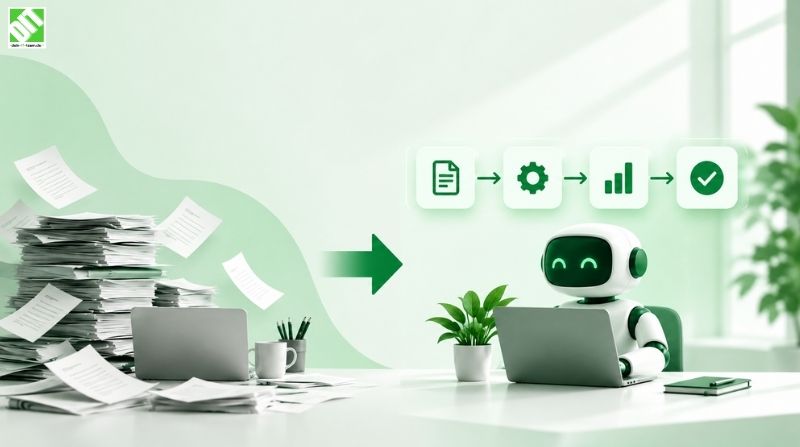
Learn how AI workflow optimization improves manual processes, connects business systems, reduces inefficiencies, and creates smarter workflows.
Many businesses are adding AI to existing workflows to save time, reduce manual work, and improve productivity. But adding AI to an inefficient process does not automatically make that process better.
In some cases, it can simply make an inefficient process run faster.
AI workflow optimization is about improving how work moves through a business by combining process redesign, automation, data, connected systems, and artificial intelligence. Instead of focusing on automating one individual task, the goal is to improve the complete workflow from input to outcome.
That can mean removing unnecessary steps, connecting disconnected systems, reducing duplicate data entry, using AI for repetitive decisions, and keeping people involved where human judgment is still important.
For businesses considering AI, this distinction matters. A successful workflow is not simply one that uses AI. It is one that produces better outcomes with less unnecessary effort.
What Is AI Workflow Optimization?
AI workflow optimization is the process of improving an existing business workflow by using artificial intelligence, automation, connected systems, and better process design.
A traditional workflow may involve several manual steps:
An employee receives information.
The information is copied into another system.
Someone reviews the information.
Another employee makes a decision.
The result is entered into another application.
A notification is sent manually.
The process is repeated for the next request.
AI workflow optimization looks at the entire sequence rather than focusing on only one task.
The question is not simply:
"Can AI perform this task?"
It is also:
"Should this step exist, and how should the complete workflow operate?"
For example, AI could extract information from an incoming document. But a more effective workflow might also validate the extracted data, check it against an existing business system, identify exceptions, route unusual cases to an employee, and automatically continue the process when everything is correct.
That is the difference between adding an AI feature and optimizing a workflow around AI.
Why AI Workflow Optimization Matters
Many organizations already use multiple software applications for sales, finance, customer support, operations, HR, reporting, and communication.
The problem is often not a lack of software. It is the way those systems and people interact.
A workflow may involve:
Multiple applications
Repeated data entry
Manual approvals
Email-based handoffs
Spreadsheet-based tracking
Unclear responsibilities
Delayed decisions
Inconsistent information
Repetitive administrative tasks
AI can help address some of these problems, but only when it is introduced at the right point in the workflow.
Research from McKinsey has found that organizations reporting stronger business impact from AI are more likely to redesign workflows rather than simply add AI to existing processes. This highlights an important point: AI adoption and workflow redesign often need to happen together.
The objective should therefore be to improve the process first and then determine where AI can contribute.
AI Workflow Optimization vs. Simple Task Automation
Task automation and AI workflow optimization are related, but they are not the same.
| Task Automation | AI Workflow Optimization |
| Automates an individual task | Improves the complete workflow |
| Usually follows predefined rules | Can use context and AI-based decisions |
| Focuses mainly on saving time | Focuses on improving the overall outcome |
| Often works within one application | Can involve multiple systems |
| Has limited decision-making | Can support decisions and exceptions |
| Usually starts with an existing process | May redesign the process before automation |
Imagine an employee receives 200 customer emails every day.
Simple automation might classify the emails and forward them to different teams.
A more optimized workflow could:
Read the incoming message.
Identify the customer's intent.
Retrieve relevant customer information.
Classify the request.
Determine whether it can be handled automatically.
Generate a suggested response when appropriate.
Escalate unusual or sensitive cases.
Record the interaction in the relevant business system.
Measure the result.
The second approach considers the complete journey rather than one isolated task.
When Should a Business Consider AI Workflow Optimization?
Not every workflow needs AI.
The best opportunities usually involve a combination of repetitive work, large amounts of information, predictable patterns, and measurable outcomes.
Look for workflows where employees regularly:
Move information between applications
Review large volumes of documents
Categorize incoming requests
Prepare recurring reports
Search through large amounts of information
Make repetitive decisions
Respond to similar customer questions
Check information against predefined criteria
Monitor recurring events
Route requests to different teams
A workflow becomes particularly interesting when it contains both repetitive work and decisions that can benefit from contextual information.
For example, processing an incoming business request may involve collecting information, checking records, categorizing the request, deciding where it should go, and notifying the responsible team.
Some of these steps may be handled through traditional automation. Others may benefit from AI. Some may still require a person.
The goal is to determine the right approach for each step rather than automatically replacing everything with AI.
How AI Workflow Optimization Works
A practical approach starts with the workflow itself, not the AI tool.
1. Map the Existing Workflow
Before changing anything, document how the process currently works.
Identify:
Inputs
Actions
Decisions
Systems involved
People involved
Approvals
Outputs
Exceptions
Delays
This often reveals problems that were previously hidden.
A process that looks simple from a management perspective may involve several manual handoffs behind the scenes.
For example, what appears to be a simple customer request may actually involve an employee checking an email, searching a CRM, opening an ERP system, copying information into a spreadsheet, requesting approval, and manually sending a response.
Mapping the process makes these hidden steps visible.
2. Identify Bottlenecks
Next, determine where the workflow loses time or creates unnecessary effort.
Common bottlenecks include:
Waiting for approvals
Repeated data entry
Manual document review
Switching between applications
Searching for information
Unclear ownership
Repetitive communication
Manual quality checks
Duplicate records
Not every bottleneck requires AI.
Sometimes the best solution is simply removing an unnecessary step.
For example, if employees manually copy information between two systems that can already communicate through an integration, improving the connection may solve the problem without introducing an AI system.
3. Separate Rules From Decisions
One useful exercise is to divide workflow actions into three categories.
Rule-based tasks
These follow predictable conditions and may be suitable for traditional automation.
AI-assisted tasks
These involve information that requires interpretation, classification, summarization, extraction, or pattern recognition.
Human decisions
These require judgment, accountability, approval, or consideration of unusual circumstances.
This separation helps prevent businesses from using AI where simpler technology would work better.
4. Decide Where AI Adds Value
Once the workflow is understood, identify the steps where AI can create measurable improvement.
AI may be useful for:
Understanding unstructured information
Classifying requests
Summarizing documents
Extracting information
Identifying patterns
Generating responses
Supporting decisions
Predicting likely outcomes
Routing work
Handling exceptions
The goal is not to maximize the number of AI components.
The goal is to improve the workflow.
For example, if a workflow contains ten steps and AI provides meaningful value in only two of them, there is no reason to force AI into the remaining eight.
5. Connect the Required Systems
An optimized workflow often needs information from multiple systems.
For example, a customer-related process might require information from:
CRM
ERP
Customer support platform
Website
Email system
Internal database
This is where APIs and system integrations become important.
Instead of requiring employees to manually move information between applications, connected systems can allow data to flow automatically through the workflow.
For businesses dealing with multiple applications, well-designed API and integration solutions can provide the technical foundation needed to connect workflow steps.
6. Add Human Review Where It Matters
AI does not need to make every decision independently.
A strong workflow can use a human-in-the-loop approach.
For example:
Low-risk request → AI handles it automatically
Unclear request → AI prepares the information → employee reviews it
High-impact decision → AI provides recommendations → authorized employee approves it
This approach can make automation more practical because people remain involved where context, accountability, or judgment matters.
NIST's AI Risk Management Framework emphasizes managing AI risks and adapting oversight to the context in which AI systems are used.
Examples of AI Workflow Optimization
Customer Support
A traditional support workflow may require an employee to read every incoming request, identify the issue, search for customer information, categorize the ticket, and assign it manually.
An optimized workflow could use AI to understand the request, retrieve relevant information, categorize the issue, suggest a response, and route complex cases to the appropriate employee.
The human team can still handle situations that require judgment.
Document Processing
Businesses often receive invoices, forms, contracts, applications, and other documents.
A traditional process may require employees to read the documents and manually enter information into another system.
AI can help extract relevant information and classify documents before the workflow validates the information and sends exceptions for human review.
This can reduce repetitive work while maintaining oversight.
Sales Operations
A sales team may spend significant time preparing information before contacting prospects.
An optimized workflow could collect relevant information, organize it, summarize important details, and prepare the next action for a salesperson.
The salesperson remains responsible for the actual relationship and decision-making.
Finance Operations
Financial workflows often contain repetitive checks, document handling, reconciliation, approvals, and reporting.
AI and automation can help identify anomalies, extract information, organize documents, and route exceptions.
Sensitive financial decisions should still have appropriate controls and human oversight.
Internal IT Support
Employees may submit similar requests repeatedly, such as access requests, password issues, or common software problems.
An optimized workflow can classify requests, provide relevant information, trigger predefined actions, and escalate problems that require specialist intervention.
This allows employees to spend less time handling repetitive requests while keeping more complex cases with the appropriate team.
What Makes an AI Workflow Effective?
Adding AI does not automatically make a workflow successful.
An effective workflow should have several characteristics.
Clear Inputs
AI needs appropriate information to produce useful results.
Poor-quality, incomplete, outdated, or inconsistent data can reduce the quality of the workflow.
Before implementation, businesses should understand where workflow data comes from and whether that information is reliable enough for the intended use.
Clear Decisions
The workflow should define what happens when the AI is confident, uncertain, or unable to complete a task.
A useful workflow should have clear paths for successful processing, uncertain results, and exceptions.
Connected Systems
Information should be able to move between the systems involved in the workflow without unnecessary manual intervention.
If employees still have to repeatedly copy information between applications, the workflow may not be fully optimized.
Defined Ownership
Someone should be responsible for monitoring the workflow and dealing with exceptions.
AI does not eliminate the need for process ownership.
Human Oversight
High-impact decisions should have appropriate review mechanisms.
The level of human involvement should depend on the risk and consequences associated with the workflow.
Measurable Outcomes
The business should know whether the optimized workflow is actually better.
Without measurable outcomes, it becomes difficult to determine whether AI has created meaningful value or simply added another technology layer.
How to Measure AI Workflow Optimization
A workflow should be measured before and after changes.
Useful metrics can include:
| Metric | What It Tells You |
| Processing time | How quickly work moves through the workflow |
| Manual effort | How much employee time is required |
| Error rate | How frequently mistakes occur |
| Exception rate | How often work requires human intervention |
| Completion rate | How much work reaches the desired outcome |
| Response time | How quickly users or customers receive a response |
| Cost per transaction | How much each workflow execution costs |
| Rework rate | How often work has to be repeated |
| User satisfaction | How employees or customers experience the process |
The most important metric depends on the workflow.
For a customer support process, response time and resolution quality may matter most.
For document processing, accuracy and exception rates may be more important.
For finance, accuracy, processing time, and control may matter more than raw speed.
A useful measurement strategy should therefore consider both efficiency and quality.
Common Mistakes in AI Workflow Optimization
Automating Before Understanding the Process
This is one of the biggest mistakes.
If nobody understands how the workflow currently operates, it is difficult to determine what should change.
Businesses may end up automating unnecessary steps or creating new dependencies around a process that should have been redesigned first.
Adding Too Many AI Tools
More tools do not necessarily create a better workflow.
Multiple disconnected AI tools can create additional handoffs, data duplication, security concerns, and maintenance requirements.
The technology should support the workflow rather than become the workflow.
Ignoring Existing Systems
A new AI solution should not automatically operate separately from the systems the business already relies on.
Existing CRM systems, ERP platforms, databases, APIs, and business applications may contain essential information.
Ignoring these systems can result in duplicate data, fragmented processes, and additional manual work.
Removing Humans Too Quickly
Some workflows contain decisions that should not be fully automated.
Human review can be especially important for sensitive, unusual, or high-impact cases.
The objective should be to determine where people create the most value, not simply reduce the number of human interactions.
Measuring Only Time Savings
A workflow that becomes faster but produces more errors is not necessarily better.
Optimization should consider quality, accuracy, cost, reliability, and business outcomes alongside speed.
Forgetting About Maintenance
Business processes change.
Policies change. Data changes. Software changes. Customer behavior changes.
An AI workflow should therefore be treated as an evolving system rather than a one-time project.
Regular monitoring, testing, and improvement can help ensure that the workflow continues to perform as expected.
Security and Data Considerations
AI workflow optimization often involves business data moving between applications and AI systems.
That creates important security considerations.
Before implementing an AI-powered workflow, businesses should understand:
What information enters the AI system
Where that information is processed
Who can access it
How long information is retained
Which systems the AI can access
What actions the AI can trigger
How access is authenticated
How activity is monitored
What happens when the AI produces an incorrect result
Access should follow the principle of giving systems and users only the permissions they actually need.
For workflows involving sensitive business or personal information, security and governance should be considered during workflow design rather than added later.
Businesses should also define what happens when an AI component fails, produces an uncertain result, or becomes unavailable. A workflow should have appropriate fallback and escalation mechanisms rather than assuming that AI will always produce the expected result.
How to Start an AI Workflow Optimization Project
A practical implementation does not require transforming every business process at once.
Start with one workflow.
Step 1: Choose a Suitable Workflow
Select a process that is repetitive, measurable, and currently creates noticeable friction.
A good starting point is usually a workflow where employees spend significant time performing repetitive activities and where the expected outcome can be clearly measured.
Step 2: Establish a Baseline
Measure the current processing time, manual effort, error rate, and other relevant metrics.
This creates a reference point for measuring whether the optimized workflow actually improves performance.
Step 3: Map the Process
Document every major step, system, decision, handoff, and exception.
Do not rely only on how the process is supposed to work. Understand how employees actually perform it.
Step 4: Remove Unnecessary Work
Do not automate a step simply because it already exists.
Ask whether it is actually needed.
Removing an unnecessary step can sometimes create more value than automating it.
Step 5: Select the Right Technology
Some steps may require traditional automation.
Others may benefit from AI.
Some may still require people.
Use the simplest technology that solves the problem effectively.
Step 6: Connect the Workflow
Integrate the applications, databases, APIs, and other systems required for the process.
The objective is to allow information to move through the workflow without unnecessary manual transfers.
Step 7: Test With Realistic Scenarios
Test normal cases, edge cases, incomplete information, incorrect inputs, and unexpected situations.
Testing should cover both technical behavior and the actual business outcome.
Step 8: Introduce Human Review
Define when the workflow should automatically proceed and when it should ask a person to intervene.
This creates clear boundaries between automated processing and human judgment.
Step 9: Measure the Results
Compare the new workflow with the original baseline.
Look at both efficiency and quality metrics.
Step 10: Improve Continuously
Use performance data and user feedback to identify additional improvements.
Businesses that need AI embedded into existing workflows can combine AI capabilities with robotic process automation to handle both repetitive tasks and more context-dependent work.
AI Workflow Optimization Is About Better Processes, Not More AI
The biggest misconception about AI workflow optimization is that success comes from adding more artificial intelligence.
It does not.
The strongest workflows start with a clear understanding of the business process.
They remove unnecessary steps.
They connect the systems involved.
They use automation where rules are predictable.
They use AI where interpretation or contextual decisions add value.
They keep people involved when judgment matters.
And they measure whether the workflow is actually producing better results.
That approach also makes AI easier to scale because the technology is being introduced into a process that has already been understood and improved.
For businesses with complex workflows, integrating AI with existing applications, APIs, automation platforms, and enterprise systems can require careful technical planning. A technology partner can help evaluate the current workflow, identify suitable opportunities, and build the connections required to turn the improved process into a working system.
Conclusion
AI workflow optimization is not about putting AI into every business process.
It is about understanding how work currently happens, finding where time and effort are being lost, and then redesigning the workflow around better technology.
For some steps, traditional automation may be enough. For others, AI can interpret information, support decisions, or handle tasks that previously required significant manual effort. APIs and integrations can connect the systems involved, while human oversight can keep important decisions under control.
The practical approach is straightforward:
Understand the workflow. Remove unnecessary work. Connect the systems. Apply AI where it adds value. Measure the outcome. Improve continuously.
When businesses approach AI this way, they are not simply adding another technology layer. They are creating workflows that are more efficient, connected, measurable, and adaptable.
For organizations exploring AI workflow optimization, the first step is usually not choosing an AI tool. It is understanding the process that needs to improve.
Frequently Asked Questions
What is AI workflow optimization?
AI workflow optimization is the process of improving business workflows by combining process redesign, AI, automation, data, and connected systems. The objective is to improve the overall workflow rather than simply automate one task.
What is the difference between AI automation and AI workflow optimization?
AI automation usually focuses on automating specific tasks. AI workflow optimization looks at the entire process, identifies unnecessary steps and bottlenecks, and then determines where automation, AI, system integration, or human involvement should be used.
How do I know if a workflow is suitable for AI?
Look for workflows that involve repetitive work, large amounts of information, recurring decisions, predictable outcomes, or significant manual effort. The best candidate is usually a measurable process where AI can improve a specific outcome.
Can AI workflow optimization work with existing software?
Yes. AI workflows can often connect with existing business applications through APIs, integrations, databases, and automation platforms. The exact approach depends on the systems involved and the type of information that needs to move between them.
Should every workflow be fully automated?
No. Some workflows require human judgment, approval, or accountability. A hybrid approach can allow AI to handle repetitive work while people review exceptions and higher-impact decisions.
How can businesses measure AI workflow optimization?
Businesses can compare metrics before and after optimization. Common measurements include processing time, manual effort, error rates, exception rates, completion rates, response time, cost per transaction, rework rate, and user satisfaction.
What are the biggest risks of AI workflow optimization?
Common risks include poor-quality data, incorrect AI outputs, excessive automation, weak access controls, disconnected systems, unclear ownership, and insufficient human oversight.
How long does AI workflow optimization take?
There is no universal timeline. A small workflow involving a few systems may be relatively straightforward, while complex enterprise workflows involving multiple applications, sensitive data, or significant decision-making require more analysis, testing, integration, and monitoring.
Can AI workflow optimization reduce manual work?
Yes. AI can reduce manual work by handling tasks such as classification, information extraction, summarization, routing, document processing, and other repetitive activities. The amount of reduction depends on the workflow and how much work can be reliably automated.
Recent Posts
October 23, 2026
November 4, 2026